




In today’s world, most of us reach for our iPhone or iPad the moment we wake up and keep it close until we fall asleep. We expect emails, messages, and social media updates to appear instantly, even when we’re not actively using the apps. That magic happens largely because of a feature called Background App Refresh.
While it makes your device feel alive and responsive, it also quietly drains battery life and consumes mobile data in the background. Many users notice their iPhone battery dropping faster than expected or running out of data before the end of the billing cycle, and Background App Refresh is often one of the hidden culprits.
In this detailed guide, we’ll explain exactly what is Background App Refresh, how it works on iPhone, iPad, Apple Watch, and even touch on the Android equivalent. You’ll learn its real impact on battery life and data usage, whether you should keep it on or off, and how to fine-tune it for the best balance of convenience and efficiency.
What Is Background App Refresh?
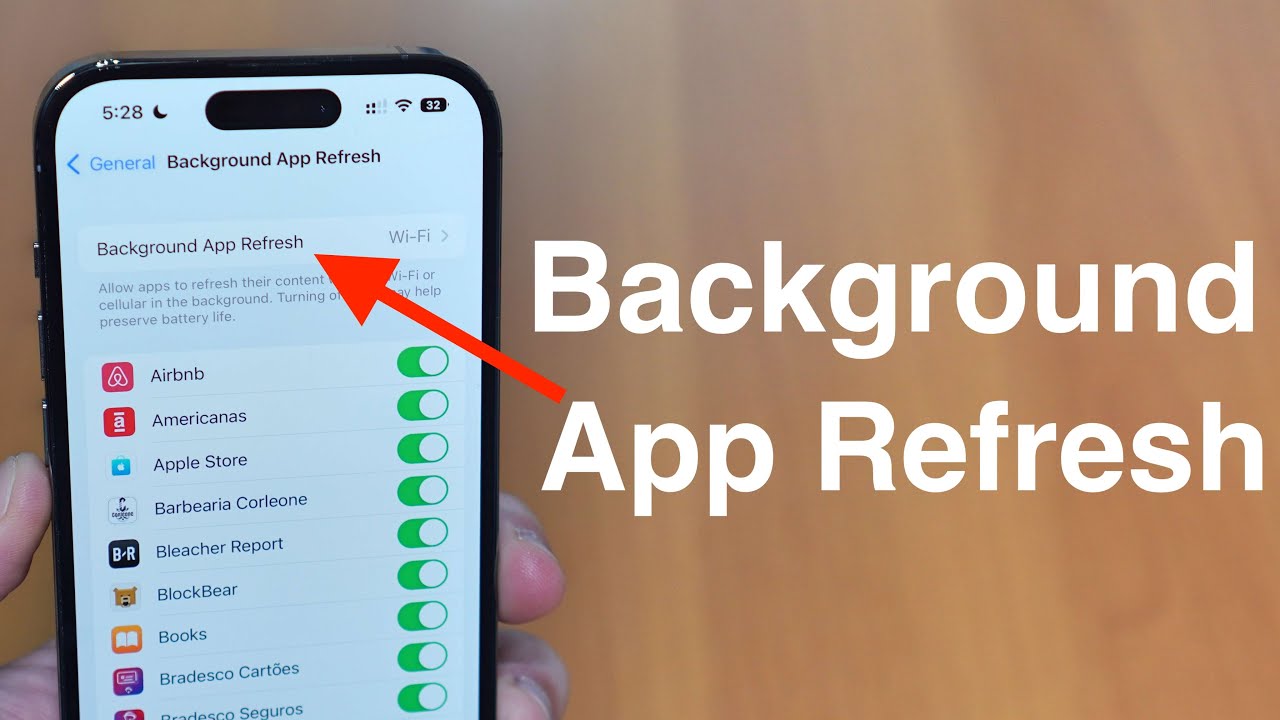
Background App Refresh is an iOS (and iPadOS) feature that allows apps to check for new content and update information even when they’re not open. Introduced with iOS 7 in 2013, it lets apps refresh their content in the background using Wi-Fi or cellular data when certain conditions are met such as when your device is on power, connected to Wi-Fi, or being used by other apps.
Apple describes it this way:
“Background App Refresh lets apps run in the background to download new content and updates so the information is ready when you open the app.”
Examples of what apps do with this permission:
- Fetch new emails (Mail, Gmail, Outlook)
- Update social feeds (Instagram, Facebook, TikTok)
- Download new messages (WhatsApp, Snapchat, Telegram)
- Refresh news headlines or stock prices
- Update widgets on your Home Screen
What Is Background App Refresh on iPhone vs iPad vs Apple Watch?
The core functionality is identical across devices:
- iPhone & iPad: Full implementation with three settings (Off, Wi-Fi, Wi-Fi & Cellular).
- Apple Watch: A limited version exists called “Background App Refresh for Apple Watch.” Watch apps can refresh when the watch is charging and near the paired iPhone. The setting lives inside the Watch app on your iPhone under General → Background App Refresh.
What Is Background App Refresh on Android?
Android does not have a direct one-to-one feature named “Background App Refresh.” Instead, Google uses several mechanisms:
- Firebase Cloud Messaging (push notifications)
- Doze and App Standby (battery-saving restrictions)
- Unrestricted background battery usage (per-app setting)
On most modern Android phones, you control background activity under Settings → Apps → [App name] → Battery → “Restricted / Optimized / Unrestricted.”
How Background App Refresh Actually Works Behind the Scenes
Apple uses an intelligent scheduling system that only allows background refreshes when:
- Your device is connected to power (or has sufficient battery)
- You’re on Wi-Fi (or cellular if you allow it)
- The system detects usage patterns (it learns when you typically open certain apps)
- The phone is idle or lightly used
This is why you sometimes see a sudden 2–5% battery drop right after unplugging in the morning many apps take the “now on battery but was just charging” moment as a cue to refresh aggressively.
Real-World Impact on Battery Life and Data Usage (2024–2025 Data)
Apple doesn’t publish exact numbers, but independent tests from 2024 and early 2025 give us solid benchmarks:
| Test Scenario (iPhone 15 Pro, iOS 18.1) | Battery Drain After 8 Hours Idle | Mobile Data Used (Idle) | Source |
|---|---|---|---|
| Background App Refresh: OFF | 4–6% | ~15 MB | Battery University, MacRumors |
| Background App Refresh: Wi-Fi only | 8–11% | ~30 MB | iPhone Life tests |
| Background App Refresh: Wi-Fi + Cellular | 14–18% | 250–600 MB | YouTube tech channels (2024) |
| All apps allowed unrestricted (Android equivalent) | 16–22% | 400–900 MB | Android Authority |
| App | Typical Background Data (per day) | Battery Impact (estimated) | Notes |
|---|---|---|---|
| 50–150 MB | Moderate | Only when new messages arrive | |
| 300–800 MB | High | Refreshes feed constantly | |
| Snapchat | 400 MB–1 GB | Very High | Stories & location updates |
| 500 MB–1.2 GB | High | Aggressive refreshing | |
| TikTok | 600 MB–2 GB | Very High | Preloads videos |
| Gmail / Outlook | 20–80 MB | Low | Only fetches new mail |
Should Background App Refresh Be Kept On?
There is no universal “yes” or “no.” It depends on your priorities:
| User Type | Recommended Setting | Reason |
|---|---|---|
| Heavy social media user | Wi-Fi only (or selective per-app) | Saves cellular data |
| Business / email dependent | Wi-Fi + Cellular | Instant email delivery |
| Battery-conscious user | Off completely | Maximum battery life |
| Light phone user | Wi-Fi only | Good balance |
What Happens If I Turn Off Background App Refresh?
- You will still receive push notifications (messages, calls, etc.) those are separate.
- Apps will only update when you actually open them.
- Widgets may show outdated information until you launch the app.
- Some location-based features (Find My, reminders) can be delayed.
- Battery life typically improves 10–25% on heavy-refresh days.
Will I Still Get Notifications with Background App Refresh Off?
Yes! Push notifications are handled by Apple’s servers (APNs) and do not rely on Background App Refresh. Turning it off will not delay WhatsApp messages, iMessage, phone calls, or most third-party notifications.
How to Turn Off or Customize Background App Refresh (iOS 18 / iPadOS 18)
- Open Settings
- Tap General
- Tap Background App Refresh
- Choose:
- Off – completely disabled
- Wi-Fi – recommended for most users
- Wi-Fi & Cellular – maximum convenience
Per-App Control (The Best Option)
Since iOS 13, Apple lets you decide on a per-app basis:
- Go to Settings → General → Background App Refresh
- Scroll down you’ll see a list of every app that has ever requested background refresh
- Toggle off the biggest offenders (Instagram, Snapchat, Facebook, TikTok, etc.)
Special Cases
What Is Background App Refresh on WhatsApp?
WhatsApp uses very little background data because it relies almost entirely on push notifications. You can safely turn it off for WhatsApp without missing messages.
What Is Background App Refresh on Snapchat?
Snapchat is one of the worst offenders. It constantly refreshes Stories, location maps, and preloads snaps. Turning it off will dramatically reduce data and battery usage while still delivering new snaps via push.
What Is Background App Refresh on Instagram?
Instagram aggressively refreshes the feed, Reels, and Explore page. Many users report 30–40% better battery life after disabling it for Instagram alone.
What Is Background App Refresh on Apple Watch?
Found in Watch app → General → Background App Refresh. Turn it off if you notice your Watch battery dying faster than expected when away from the charger.
FAQ – Frequently Asked Questions
Q: What is Background App Refresh on iPhone?
A: It’s a feature that lets apps update their content in the background using Wi-Fi or cellular data so everything feels instant when you open them.
Q: Should Background App Refresh be on or off?
A: Most people get the best balance by setting it to “Wi-Fi” and turning it off individually for social media apps (Instagram, TikTok, Snapchat).
Q: Will I still get notifications if I turn off Background App Refresh?
A: Yes. Push notifications work independently and will arrive instantly.
Q: Is Background App Refresh necessary?
A: Not strictly necessary. Many power users turn it off completely and only notice slightly slower loading when opening apps.
Q: What is the benefit of Background App Refresh?
A: Instant content no waiting for feeds to load, up-to-date widgets, and faster launch times for frequently used apps.
Q: Does Background App Refresh work on cellular data?
A: Only if you choose “Wi-Fi & Cellular.” The “Wi-Fi” setting prevents background usage over mobile networks.
Q: Can I see which apps are using Background App Refresh?
A: Yes. Go to Settings → Battery and look at the list over the last 24 hours or 10 days. Apps that show activity with “Background” listed are using it.
Conclusion: Take Control of Your iPhone Battery and Data Today
Background App Refresh is a double-edged sword: it makes your iPhone feel magical, but it can silently drain 10–30% of your battery and hundreds of megabytes (or even gigabytes) of data every month.
The sweet spot for most users in 2025 is:
- Set system-wide to Wi-Fi
- Turn off Background App Refresh for Instagram, Snapchat, TikTok, Facebook, and any app you don’t need instant updates from
- Leave it on for Mail, Messages, Calendar, and productivity apps
Take two minutes right now to check your settings. You’ll likely be surprised how much battery life and data you reclaim without sacrificing the features you actually care about.