




In today’s fast-paced world of remote collaboration, where teams span continents and meetings happen across time zones, seamless video conferencing isn’t just a nice-to-have it’s essential for productivity and connection. But behind those crystal-clear multi-party calls lies a critical piece of technology: the multipoint control unit, or MCU. Whether you’re a business leader scaling virtual town halls or an IT admin troubleshooting hybrid setups, understanding this device can transform how you approach video communication. As remote work solidifies with over 58 million Americans projected to work from home at least part-time by 2025 the demand for reliable, scalable solutions like MCUs has never been higher. In this guide, we’ll demystify what a multipoint control unit is, explore its roles in networking and servers, and break down its inner workings, all while highlighting why it’s a cornerstone of modern video conferencing.
What Is a Multipoint Control Unit?
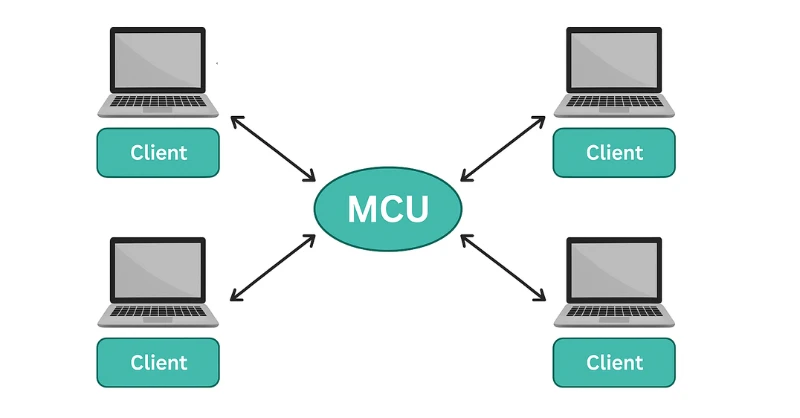
At its core, a multipoint control unit (MCU) is a specialized device or software server designed to connect and manage multiple video conferencing endpoints in a single session. Think of it as the conductor of a virtual orchestra, ensuring that audio, video, and data streams from various participants harmonize without chaos. Unlike simple point-to-point calls, where two users connect directly, an MCU enables multipoint conferences, allowing three or more participants to interact in real time.
The term “multipoint control unit” originated in the early days of videoconferencing standards, particularly with protocols like H.323, which formalized how devices could bridge calls across networks. Today, MCUs are integral to systems using SIP (Session Initiation Protocol) and WebRTC, powering everything from Zoom-like platforms to enterprise-grade setups. They handle the heavy lifting of stream processing, making sure everyone sees the active speaker or a shared grid view, regardless of their device’s capabilities.
What makes an MCU indispensable? It solves the bandwidth and compatibility nightmares of direct connections. For instance, if one participant is on a low-bandwidth mobile link while another streams 4K video from a conference room, the MCU adapts and balances the flow. This isn’t just technical wizardry it’s what keeps global teams aligned, reducing miscommunication that costs businesses an estimated $37 billion annually in the U.S. alone.
What Is an MCU Unit?
Diving deeper, an MCU unit refers to the physical or virtual embodiment of this technology a self-contained module that acts as a central gateway in multipoint videoconferencing systems. Often deployed as a rack-mounted appliance or cloud-based software instance, an MCU unit integrates hardware processors for media handling and a control layer for session management.
In practical terms, an MCU unit is like a high-tech switchboard. It receives incoming streams from endpoints (such as IP cameras, laptops, or room systems), processes them, and redistributes a unified output. Early MCU units were bulky hardware boxes from vendors like Cisco, but modern ones are lightweight software running on standard servers, leveraging GPUs for efficient transcoding. This evolution has democratized access, allowing small businesses to deploy MCU units without multimillion-dollar investments.
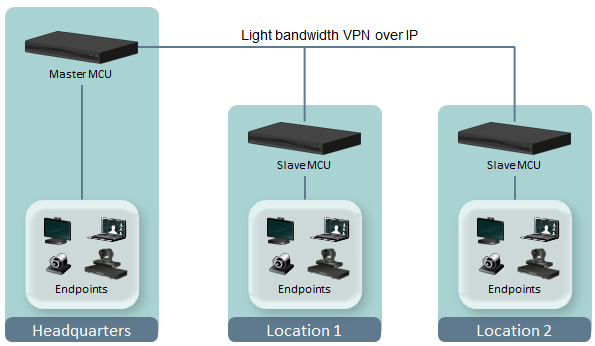
Key to its design is modularity: ports for multiple connections, support for encryption like SRTP, and scalability via cascading (linking multiple MCUs for larger conferences). If you’re wondering about integration, most MCU units plug into existing networks via Ethernet or IP, supporting up to 100+ participants depending on the model.
What Is MCU in Networking?
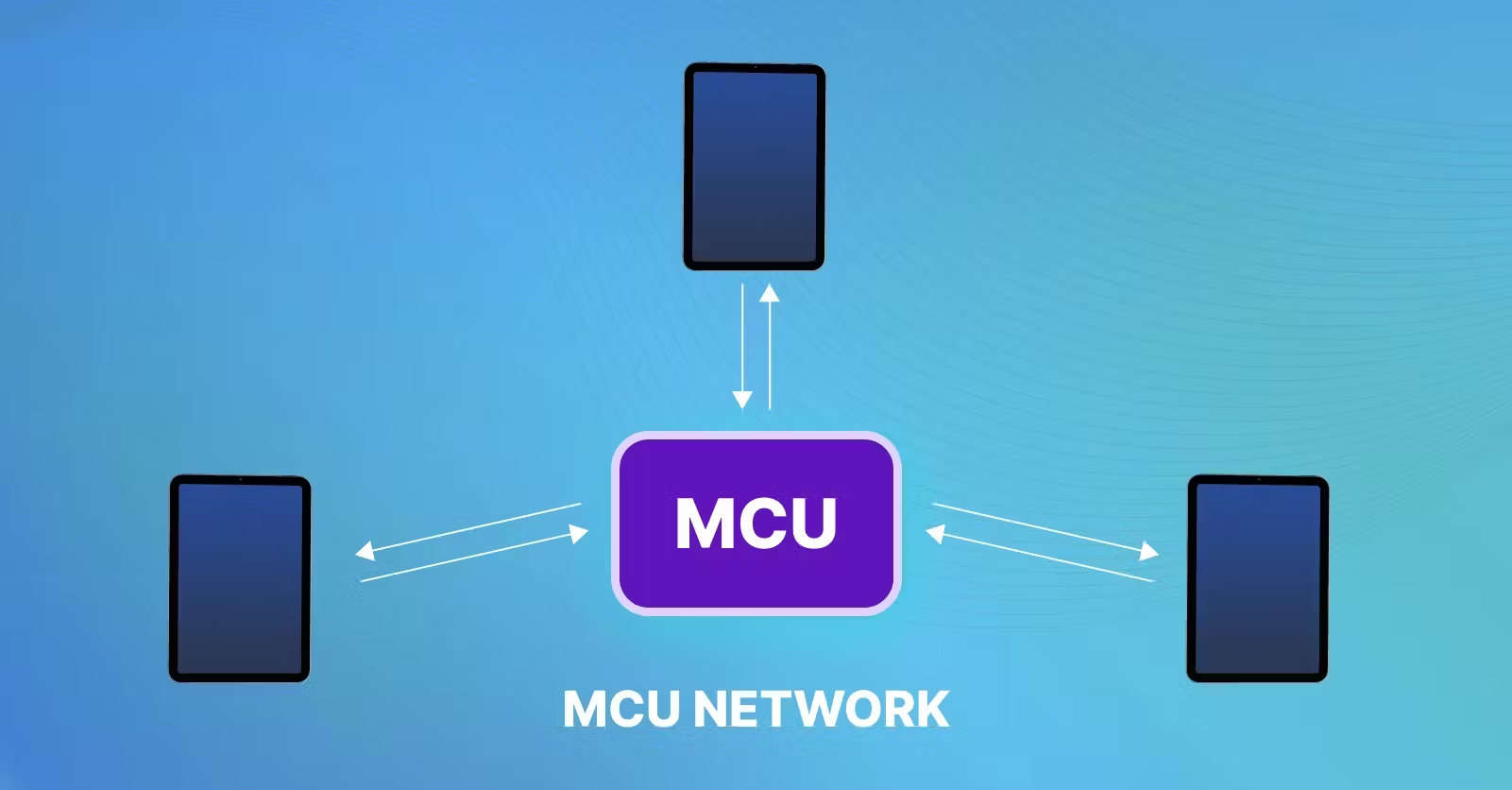
In the realm of networking, an MCU serves as a bridge for multipoint connections, enabling seamless data flow across disparate systems. It’s essentially a network appliance that aggregates and routes video, audio, and control signals, preventing the bottlenecks of mesh topologies where every endpoint connects to every other.
MCU in networking shines in scenarios like corporate intranets or public internet calls, where firewalls and NAT traversal could otherwise derail sessions. By centralizing traffic, it optimizes bandwidth distributing a single mixed stream instead of N-1 individual ones (for N participants). This is crucial in bandwidth-constrained environments, such as branch offices or mobile hotspots.
From a protocol standpoint, MCUs in networking adhere to standards like H.323 for gatekeeper interactions and SIP for endpoint signaling. They also handle QoS (Quality of Service) prioritization, ensuring voice packets take precedence over video to minimize jitter. In enterprise networks, this translates to reliable hybrid meetings, where an MCU might integrate with VoIP PBXs for dialing in audio-only participants. Without it, networking video calls would devolve into laggy, incompatible messes, underscoring its role as the unsung hero of converged media networks.
What Is MCU in Servers?
When we talk about MCU in servers, we’re looking at its role as a server-side powerhouse for video processing. Here, the multipoint control unit operates as a dedicated application or virtual machine on a server cluster, offloading computational tasks from end-user devices. This server-centric approach is the backbone of cloud-based video platforms, where scalability is king.
In server environments, an MCU functions as a transcoding engine, converting streams between formats (e.g., H.264 to VP8) to ensure compatibility. It’s particularly vital in data centers, where high-availability clustering allows failover and load balancing for uninterrupted service. For example, in a server farm, multiple MCU instances might handle regional traffic, using APIs to integrate with CRM tools or analytics dashboards.
The beauty of MCU in servers lies in resource efficiency: by centralizing mixing and encoding, it frees client devices from heavy lifting, ideal for thin clients or IoT endpoints. However, this demands robust server specs think multi-core CPUs and ample RAM—to avoid bottlenecks. In hybrid cloud setups, server-based MCUs bridge on-premises hardware with SaaS services, offering a flexible path for organizations migrating to the cloud.
How Does a Multipoint Control Unit Work?
Understanding how a multipoint control unit works reveals its elegance as a media orchestrator. At a high level, an MCU receives raw streams from participants, processes them centrally, and broadcasts a polished composite back out. This hub-and-spoke model contrasts with decentralized alternatives, prioritizing control over raw speed.
Components of an MCU
An MCU comprises two main pillars: the media processing unit (MPU) and the control unit. The MPU handles the grunt work—decoding incoming RTP (Real-time Transport Protocol) packets, applying algorithms for noise suppression, and composing layouts. It often includes DSPs (Digital Signal Processors) for audio mixing and ASICs/GPUs for video scaling.
The control unit, meanwhile, manages signaling via SIP/H.323, authenticating users, allocating resources, and enforcing policies like encryption. Together, these components form a resilient system, with redundancy features like RAID storage for session persistence.
The Process: From Input to Output
Let’s break it down step by step:
- Connection and Stream Ingestion: Participants dial in via endpoints. The MCU’s control unit authenticates and establishes SIP sessions, then the MPU ingests unidirectional streams (audio/video/data) over UDP-based RTP.
- Decoding and Pre-Processing: Each stream is decrypted and decoded. Audio undergoes VAD (Voice Activity Detection) to identify speakers, while video is analyzed for resolution and frame rate. Adaptive algorithms here adjust for network conditions, dropping frames if latency spikes.
- Mixing and Composition: This is the MCU’s magic. Audio streams are mixed into a single multichannel output, with active speakers amplified. Video gets composed into layouts—e.g., a 3×3 grid for nine users or spotlight mode for the loudest voice. Transcoding happens here too, converting formats and transrating bitrates (e.g., from 4Mbps to 512kbps for mobile users).
- Encoding and Distribution: The composite stream is re-encoded (often in multiple variants for heterogeneous devices), encrypted, and multicast or unicast back to participants. This single-stream delivery slashes upstream bandwidth needs by up to 90%.
- Feedback and Optimization: Throughout, the MCU monitors metrics like packet loss, using RTCP (RTP Control Protocol) for real-time tweaks. Features like recording capture the mix for archiving.
This cycle repeats fluidly, supporting dynamic changes like participant muting or screen sharing, all with sub-200ms latency in optimized setups.
Benefits and Limitations of Multipoint Control Units
MCUs offer compelling upsides for video conferencing. They excel at device agnosticism, supporting legacy hardware alongside 8K streams, which is a boon for diverse workforces. Centralized processing enhances security through server-side firewalls and compliance logging, while features like continuous presence (showing all participants) foster inclusivity.
Yet, no tech is flawless. MCUs introduce latency from round-trip processing—up to 100ms more than direct links—and scale linearly, demanding beefier servers for 50+ users. Security trade-offs are notable: stream decryption for mixing precludes end-to-end encryption, a red flag for sensitive sectors like healthcare. Costs add up too, with hardware units running $10,000+ and cloud subscriptions scaling per minute.
Despite these, for controlled environments, the pros often outweigh the cons, especially when paired with hybrid deployments.
MCU vs. Other Architectures: A Comparison
To contextualize MCUs, consider their place among peers like P2P (peer-to-peer) and SFU (Selective Forwarding Unit). P2P is lightweight for duos but buckles under crowds; SFUs forward streams without mixing, slashing server CPU but hiking client bandwidth.
Here’s a quick comparison table:
| Aspect | MCU (Multipoint Control Unit) | SFU (Selective Forwarding Unit) | P2P (Peer-to-Peer) |
|---|---|---|---|
| Architecture | Centralized mixing and distribution | Centralized forwarding, client-side mixing | Direct device-to-device connections |
| Scalability | Moderate (linear server load) | High (low server processing) | Low (exponential endpoint load) |
| Latency | Higher (processing overhead) | Lower (minimal server intervention) | Lowest (direct paths) |
| Bandwidth Use | Low on clients, high on server | High on clients, moderate on server | Balanced but spikes with participants |
| Device Support | Excellent (handles legacy/low-power) | Good (relies on client capabilities) | Variable (burdens weak devices) |
| Security | Server-trusted (no E2E encryption) | Supports E2E (selective relay) | Full E2E possible |
| Best For | Enterprise control, recording | Modern apps, low-latency streaming | Small, informal calls |
| Cost | High infrastructure | Medium (easier scaling) | Low (no intermediaries) |
Applications and Use Cases
MCUs power diverse applications. In education, they enable virtual classrooms with breakout rooms; in healthcare, teleconsults with overlaid patient data. Enterprises use them for all-hands meetings, integrating with tools like Microsoft Teams. Emerging use cases include AR/VR integrations, where MCUs mix 360-degree feeds, and IoT, bridging smart cameras into conferences.
Real-world example: A multinational firm deploys an on-prem MCU for secure board meetings, cascading units across regions for 200+ attendees without cloud dependency.
The Future of MCUs in Video Conferencing
As 5G and edge computing advance, MCUs are evolving toward hybrid models blending with SFUs for adaptive scaling. AI enhancements, like auto-layouts via facial recognition, promise smarter mixing, while quantum-safe encryption could resolve security woes. By 2030, expect MCU-like processing in edge devices, reducing central latency. For now, they’re bridging the gap to immersive metaverses, ensuring video stays human-centric.
FAQ
What is the main difference between an MCU and a gateway in video conferencing?
An MCU focuses on mixing and distributing streams within a conference, while a gateway translates between incompatible protocols (e.g., IP to ISDN), acting more as a protocol converter than a media mixer.
Can an MCU support more than 50 participants?
Yes, many modern MCUs handle 100+ via cascading, but performance depends on server resources—expect trade-offs in quality for ultra-large sessions.
Is an MCU necessary for small team calls?
Not always; P2P or SFU suffices for 5-10 users. MCUs shine in larger, feature-rich setups needing central control.
How does MCU in servers improve cost efficiency?
By offloading processing to scalable cloud servers, it reduces endpoint hardware needs, with pay-per-use models cutting upfront costs by 40-60%.
What protocols does a multipoint control unit typically support?
Primarily SIP and H.323, with extensions for WebRTC and RTMP for broader compatibility.
Are there open-source alternatives to commercial MCUs?
Yes, projects like Jitsi or BigBlueButton offer MCU-like functionality, though they may lack enterprise-grade scaling.
How secure is a multipoint control unit for sensitive data?
MCUs use TLS/SRTP for transport encryption, but central mixing requires trusting the server—opt for on-prem deployments in regulated industries.
Conclusion
From bridging global teams to powering immersive collaborations, the multipoint control unit stands as a testament to how far video tech has come. We’ve covered its essence as an MCU unit, its networking prowess, server-side muscle, and step-by-step mechanics proving it’s more than jargon; it’s the enabler of connected futures. As hybrid work endures, investing in MCU-savvy systems could be your edge.