





Pinterest stands apart as a visual discovery platform where users actively seek inspiration for purchases, projects, and lifestyle ideas. With high purchase intent built into the experience, pinterest ads offer businesses a powerful way to reach motivated audiences. Mastering the pinterest ads manager unlocks targeted campaigns that drive traffic, conversions, and brand awareness effectively.
This guide provides a step-by-step walkthrough of how to use pinterest ads manager, best practices for 2026, campaign structures, and optimization strategies. Whether you’re new to paid social or refining existing efforts, these insights help create campaigns that align with Pinterest’s unique user behavior.
Why Pinterest Ads Matter for Modern Marketing
Pinterest users come with intent they plan weddings, home renovations, outfits, and meals. This mindset makes the platform ideal for pinterest ads that feel helpful rather than intrusive.
Pinterest Ads Manager provides tools for precise targeting, creative flexibility, and performance tracking. Campaigns here often yield strong ROI because they reach people in the research and consideration phases of buying journeys. Understanding the manager’s features allows marketers to craft experiences that blend seamlessly with organic discovery.
Getting Started with Pinterest Ads Manager
Before diving in, ensure you have a Pinterest Business Account. Convert a personal account or create a new one through the business hub. Verify your website and install the Pinterest Tag for accurate tracking.
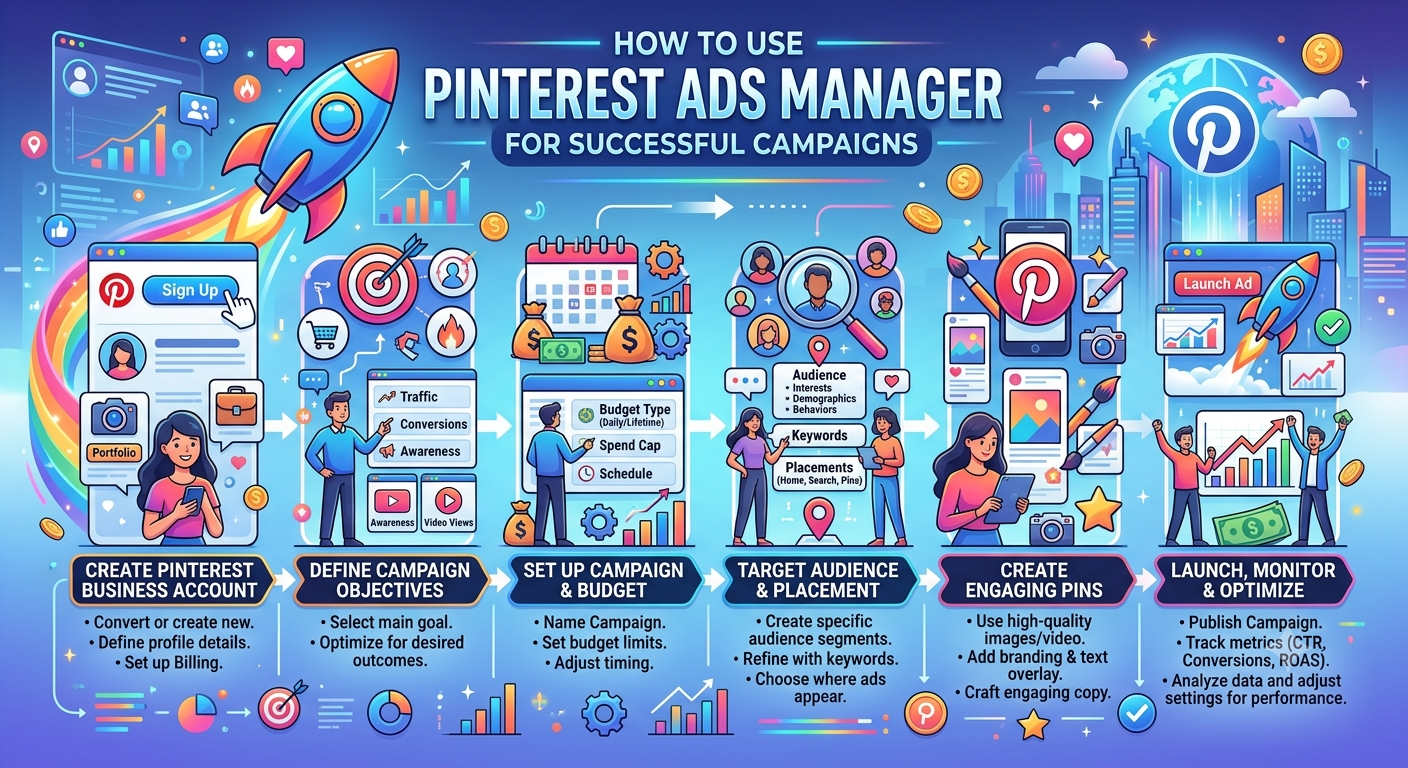
Step-by-Step Setup in Pinterest Ads Manager:
- Access the Manager: Log into your business account and navigate to Ads Manager.
- Create a Campaign: Select your objective awareness, traffic, conversions, or catalog sales.
- Define Audience: Use interests, demographics, keywords, or lookalike audiences based on past engagers.
- Set Budget and Schedule: Choose daily or lifetime budgets and campaign duration.
- Design Creatives: Upload Pins optimized for the platform (vertical formats perform best).
- Launch and Monitor: Review, launch, and use built-in analytics for ongoing adjustments.
Pinterest Ads Library serves as a valuable research tool study competitors’ active campaigns for inspiration on creative and targeting approaches.
Campaign Objectives and Structures
Pinterest Ads Manager supports various goals:
- Awareness Campaigns: Introduce brands to new audiences through visually striking Pins.
- Traffic and Engagement: Drive clicks to websites or increase saves and comments.
- Conversions: Focus on actions like purchases or sign-ups with optimized bidding.
- Video Views: Leverage short-form content for storytelling.
For e-commerce, catalog sales campaigns automatically promote products from your feed. Start simple with automated options before moving to manual setups for greater control.
Creative Best Practices for Pinterest Ads
Success hinges on visuals that inspire action:
- Use high-quality, vertical images or videos (2:3 ratio recommended).
- Include clear text overlays with benefits or calls-to-action.
- Showcase products in lifestyle contexts rather than isolated shots.
- Test multiple variations per ad group.
- Maintain brand consistency while adapting to seasonal trends.
Pinterest ads perform best when they feel like natural Pins authentic, aspirational, and actionable. Avoid hard-selling; focus on inspiration.
Targeting Strategies That Work
Effective targeting combines platform data with your insights:
- Interest and Keyword Targeting: Reach users searching or engaging with related topics.
- Audience Lists: Upload customer emails or use website visitors for retargeting.
- Lookalikes: Expand reach by finding users similar to your best customers.
- Demographics: Layer age, gender, location, or device preferences.
Refine audiences over time based on performance data. Pinterest’s visual nature means interest-based targeting often outperforms strict demographics.
Budgeting and Bidding in Pinterest Ads Manager
Start with modest daily budgets to test ($50–$100) before scaling. Pinterest offers automated bidding for objectives or manual CPC/CPM control.
Monitor frequency to avoid ad fatigue. Allocate budget across testing and scaling phases many successful campaigns begin with broad testing before narrowing to high-performers.
Optimization and Analytics
Regular review separates good campaigns from great ones:
- Check key metrics: CTR, CPC, ROAS, and engagement rate.
- Pause underperformers and scale winners.
- A/B test creatives, audiences, and landing pages.
- Use the Pinterest Tag and enhanced conversions for accurate attribution.
Pinterest Ads Manager dashboards provide clear visualizations. Export data for deeper analysis in external tools when needed.
Table: Pinterest Ad Formats and Best Uses
| Ad Format | Best For | Key Specs | Engagement Potential |
|---|---|---|---|
| Promoted Pins (Static) | Brand awareness, inspiration | Vertical images, text overlays | High saves/shares |
| Video Ads | Storytelling, tutorials | Up to 15-60 seconds | Strong view-through |
| Carousel Ads | Product showcases | Multiple images in one Pin | High interaction |
| Shopping Ads | Direct sales | Catalog integration | Conversion-focused |
This table summarizes options to match goals with formats.
Common Challenges and Solutions
New advertisers often face low initial performance. Address this by:
- Ensuring website compatibility and fast loading.
- Creating mobile-optimized landing pages.
- Testing multiple creatives early.
- Allowing learning periods (7-14 days) before major changes.
Compliance with Pinterest’s advertising policies avoids disapprovals review guidelines on prohibited content and claims.
Measuring Success and Scaling
Define KPIs upfront aligned with business goals. Track not just clicks but downstream conversions. Successful campaigns often expand by duplicating top performers and testing new audiences or creatives.
Pinterest ads integration with e-commerce platforms simplifies catalog campaigns for retailers.
FAQ: How to Use Pinterest Ads Manager
1. How do I access Pinterest Ads Manager?
Through a Pinterest Business Account navigate to the Ads section after setup.
2. What is the minimum budget for Pinterest ads?
Daily budgets start low, but test with at least $50 to gather meaningful data.
3. How does the Pinterest Ads Library help?
It allows viewing active competitor ads for creative and strategy inspiration.
4. Are Pinterest ads suitable for all businesses?
Best for visual or inspiration-driven categories like fashion, home, food, and travel.
5. How long does it take to see results from Pinterest campaigns?
Initial learning takes 1-2 weeks; meaningful insights emerge after consistent optimization.
6. Can I run Pinterest ads without a website?
Limited options exist, but a website or landing page significantly improves performance.
7. What makes a good Pinterest ad creative?
High-quality vertical visuals, clear value, and inspirational context that fits naturally into user feeds.
Conclusion
Mastering how to use pinterest ads manager opens opportunities to reach highly engaged, purchase-ready audiences. Focus on compelling creatives, smart targeting, continuous testing, and data-driven optimization for successful pinterest ads campaigns.