


In our always-connected world, reliable internet access away from home or office has become essential. Whether traveling, working remotely, or facing outages, a mobile hotspot provides a flexible solution. Understanding what is a mobile hotspot and how does it work empowers users to stay productive and connected without relying solely on public Wi-Fi or cellular data plans on individual devices.
This guide breaks down the technology, setup process, benefits, limitations, and practical tips for maximizing its potential in 2026.
Understanding Mobile Hotspots: The Basics
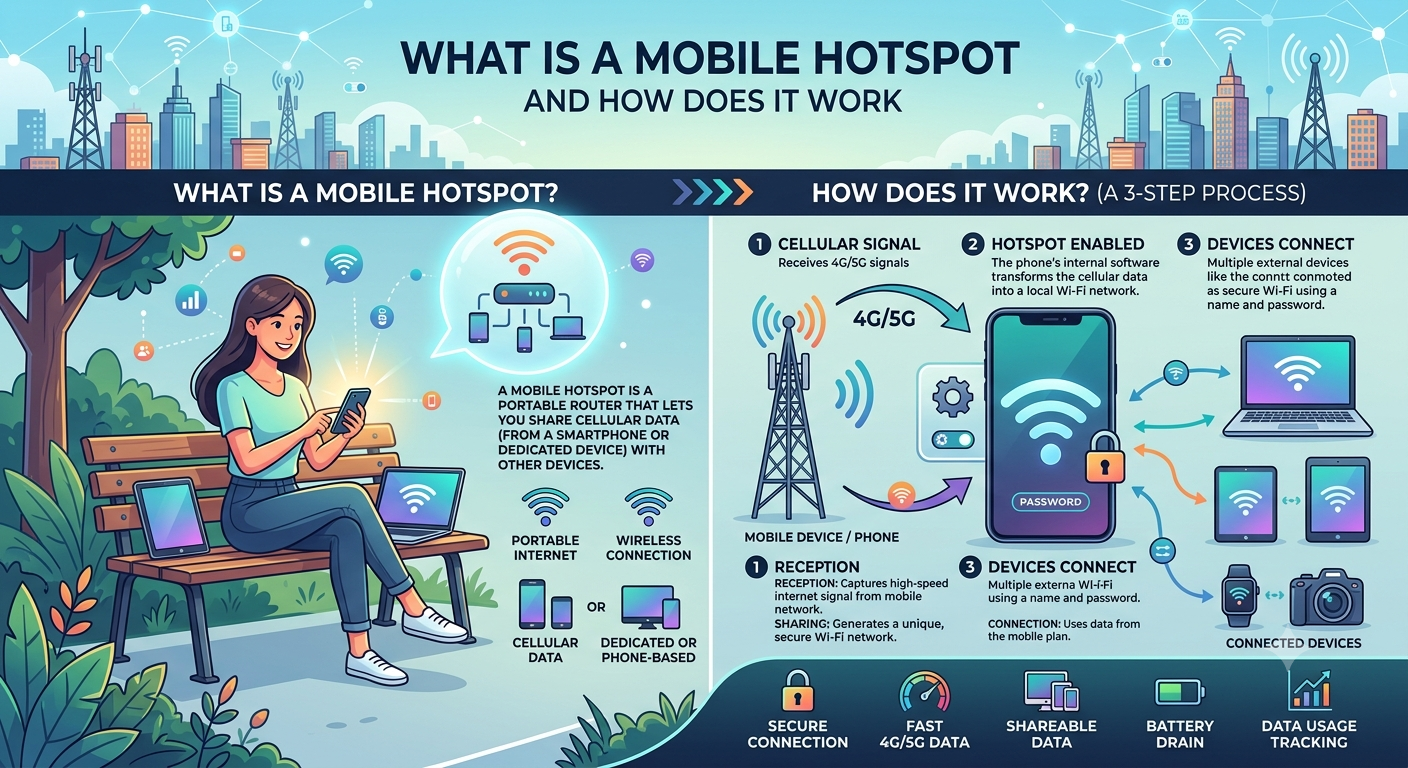
A mobile hotspot is a device or feature that uses cellular data to create a portable Wi-Fi network. It shares an internet connection from a cellular provider with multiple devices like laptops, tablets, and other phones.
What is a mobile hotspot in simple terms? Think of it as a mini router that converts 4G/5G cellular signals into a local Wi-Fi network. Most modern smartphones include built-in hotspot functionality, while dedicated devices offer more robust performance for heavier use.
The technology relies on cellular networks rather than fixed broadband, making it truly portable. This capability has transformed how people work, travel, and stay connected during emergencies.
How Does a Mobile Hotspot Work?
The process involves several technical steps:
- Cellular Connection: The hotspot device connects to nearby cell towers using a SIM card and cellular radio.
- Data Conversion: It receives data via 4G LTE or 5G networks.
- Wi-Fi Broadcasting: The device creates a local Wi-Fi network (usually 2.4GHz or 5GHz) and shares the cellular connection.
- Device Access: Other gadgets connect to this Wi-Fi network using a password, routing their internet traffic through the hotspot.
Advanced models support simultaneous connections (often 5–10 devices) and may include Ethernet ports or advanced security features. Speed and reliability depend on signal strength, network congestion, and your data plan.
What is a mobile hotspot technically? It’s a bridge between wide-area cellular networks and local personal area networks, using Network Address Translation (NAT) to manage multiple connections efficiently.
Types of Mobile Hotspots
- Smartphone Hotspots: Built into most modern phones. Convenient but drains battery quickly.
- Dedicated Portable Hotspots: Standalone devices with dedicated batteries and stronger antennas.
- Vehicle Hotspots: Integrated into cars or available as aftermarket add-ons.
- Router-Style Hotspots: Larger units for semi-permanent setups like RVs or offices.
Dedicated devices generally offer better performance for multiple users or data-heavy tasks.
Setting Up and Using a Mobile Hotspot
For Smartphone Hotspots:
- Go to settings > Network & Internet (or Connections) > Hotspot & Tethering.
- Enable the hotspot and set a strong password.
- Connect other devices to the new Wi-Fi network.
For Dedicated Devices:
- Insert an active SIM card.
- Power on and follow on-screen setup for network connection.
- Configure Wi-Fi name and password through the device’s interface or companion app.
Monitor data usage closely hotspots consume cellular data quickly, especially with video streaming or large downloads. Most carriers offer specific hotspot plans or data allotments.
Benefits of Using a Mobile Hotspot
- Portability: Internet anywhere with cellular coverage.
- Cost Efficiency: Share one data plan across devices instead of multiple lines.
- Security: Avoid risky public Wi-Fi networks.
- Reliability: Backup during home internet outages.
- Flexibility: Ideal for travel, remote work, or events.
For digital nomads or field professionals, a reliable hotspot becomes indispensable.
Limitations and Considerations
- Data Caps: Cellular plans often have limits or throttling after high usage.
- Signal Dependency: Performance drops in areas with weak coverage.
- Battery Life: Dedicated devices last longer than phone hotspots, but still require charging.
- Speed Variability: 5G offers impressive speeds in ideal conditions, but real-world results vary.
- Cost: Dedicated devices plus service plans add expense.
What is a mobile hotspot best suited for? Short-term or mobile needs rather than primary home internet replacement.
Comparison Table: Mobile Hotspot Options
| Type | Battery Life | Max Connections | Best For | Approximate Cost (Device) |
|---|---|---|---|---|
| Smartphone Feature | 2-6 hours | 5-10 | Occasional, light use | Included with phone |
| Dedicated Portable | 8-24 hours | 10-20 | Travel, remote work | $100–$300 |
| Vehicle Integrated | Vehicle power | Varies | Road trips, fleet use | Varies |
| Router-Style | Plugged in | 20+ | Temporary offices, RVs | $150–$400 |
This table helps match options to specific use cases.
Security Best Practices for Mobile Hotspots
- Use strong, unique passwords and change them regularly.
- Enable WPA3 encryption when available.
- Disable the hotspot when not in use.
- Monitor connected devices through the admin interface.
- Consider VPN usage for sensitive activities on public cellular networks.
Security awareness prevents unauthorized access and data interception.
Choosing the Right Data Plan and Provider
Evaluate coverage maps, data allowances, and hotspot-specific policies. Some carriers offer unlimited plans with generous hotspot data, while others charge extra or throttle speeds. International travelers should research roaming options or local SIMs.
Future of Mobile Hotspots
5G rollout and Wi-Fi 6/7 integration promise faster, more reliable connections. eSIM technology simplifies switching providers. Integration with satellite networks may extend coverage to remote areas.
FAQ: What Is a Mobile Hotspot and How Does It Work
1. What is a mobile hotspot in simple terms?
It’s a device or phone feature that creates a portable Wi-Fi network using cellular data.
2. How much does a mobile hotspot cost?
Dedicated devices range from $100–$300, plus monthly service fees depending on data needs.
3. Can I use my phone as a mobile hotspot?
Yes, most smartphones support this, though it consumes battery and data quickly.
4. Is a mobile hotspot secure?
It can be when using strong passwords, encryption, and monitoring connected devices.
5. How many devices can connect to a mobile hotspot?
Typically 5–20 depending on the model and network conditions.
6. Does using a mobile hotspot use more data?
Yes, because multiple devices share the connection, potentially increasing consumption rapidly.
7. What is the difference between a mobile hotspot and tethering?
Tethering usually refers to USB or Bluetooth sharing, while hotspots create a Wi-Fi network.
Conclusion
Understanding what is a mobile hotspot and how does it work equips you with a versatile tool for staying connected anywhere. From occasional phone use to dedicated devices for heavy workloads, the right setup enhances productivity and flexibility.