




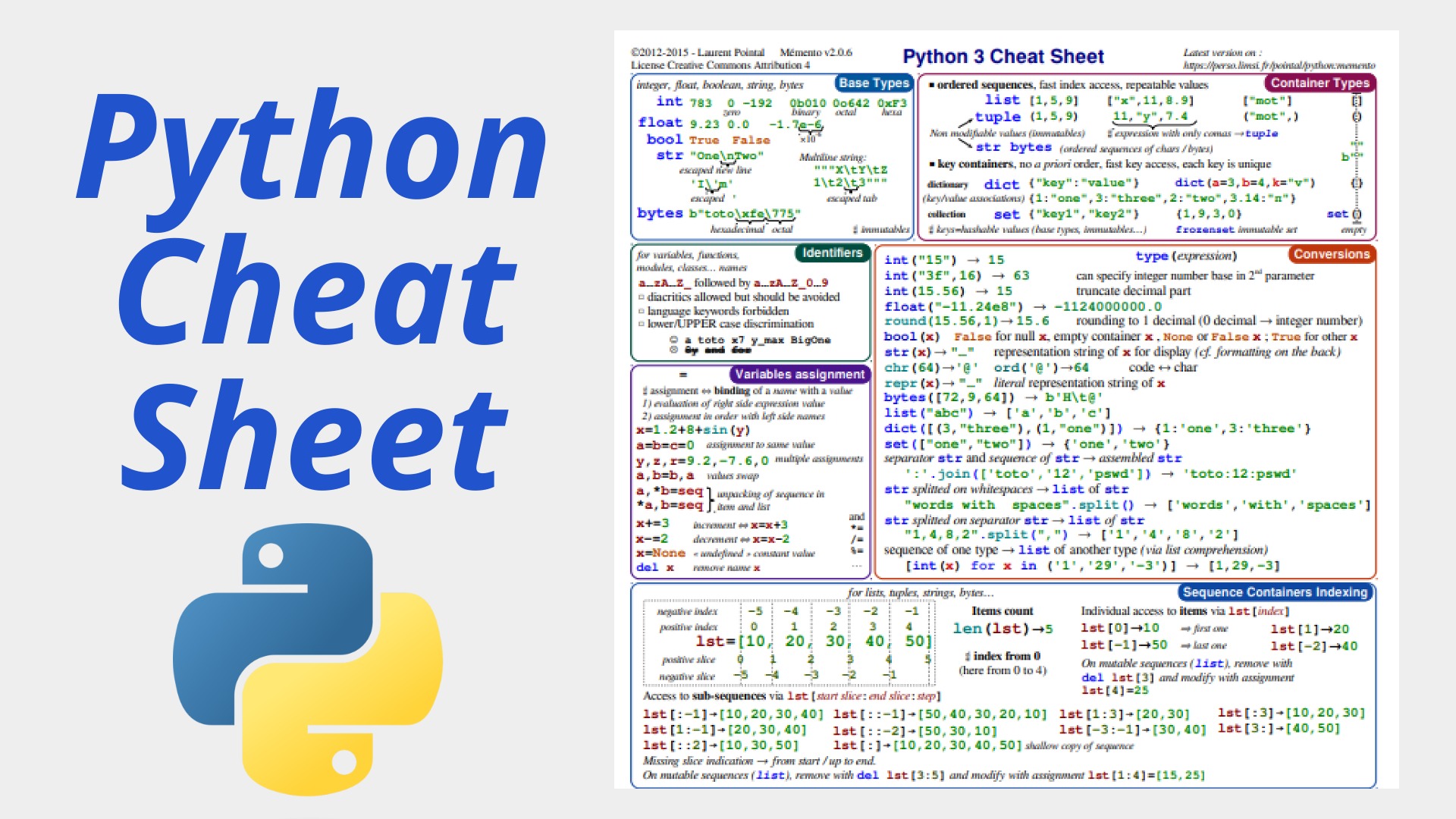
Python remains one of the most popular programming languages in 2026, powering everything from web development and data science to automation and AI. Whether you’re debugging code at 2 a.m., prepping for a technical interview, or just refreshing your memory on syntax, a solid python cheat sheet saves time and reduces frustration. This comprehensive guide serves as the only python cheat sheet you need, covering basics to advanced topics with practical examples. It’s designed for quick reference, helping beginners build confidence and experienced developers stay sharp. Many developers turn to a python cheat sheet pdf for offline use consider printing this or saving it as one. With Python 3.12+ features like improved type hints and performance gains still relevant, this sheet focuses on timeless essentials plus modern best practices.
Why Every Python Developer Needs a Cheat Sheet
Python’s readability is legendary, but its vast ecosystem lists, dictionaries, comprehensions, libraries like pandas and re means even pros forget details. A good python cheat sheet acts as a mental shortcut, boosting productivity by letting you focus on logic instead of syntax lookups. For python cheat sheet for beginners, it demystifies core concepts; for interviews, it helps recall patterns quickly. Resources like Real Python, DataCamp, and community favorites (updated into 2026) emphasize quick-reference tools. Whether you’re after a basic python cheat sheet or an advanced python cheat sheet pdf, having one handy streamlines workflows in Jupyter notebooks, VS Code, or during coding challenges.
Python Basics: The Foundation Every Beginner Needs
Start here if you’re new. This section forms the core of any python cheat sheet for beginners.
- Variables and Data TypesPython
name = "Alice" # string age = 30 # integer height = 5.9 # float is_active = True # boolean none_value = None # NoneType - Basic OperationsPython
# Arithmetic sum_val = 10 + 5 # 15 diff = 10 - 3 # 7 prod = 4 * 6 # 24 div = 10 / 3 # 3.333... (float) floor_div = 10 // 3 # 3 mod = 10 % 3 # 1 power = 2 ** 3 # 8 # Comparison 5 > 3 # True 10 == "10" # False (type matters) - StringsPython
greeting = "Hello" name = "World" full = greeting + ", " + name + "!" # Concatenation formatted = f"{greeting}, {name}!" # f-string (Python 3.6+) greeting.upper() # "HELLO" " spaces ".strip() # "spaces" "python".replace("p", "P") # "Python" - Lists (mutable, ordered)Python
fruits = ["apple", "banana", "cherry"] fruits.append("date") # Add item fruits.pop() # Remove last fruits[1] # "banana" (indexing) fruits[1:3] # ["banana", "cherry"] (slicing) len(fruits) # Length - Tuples (immutable)Python
coords = (10, 20) x, y = coords # Unpacking - Dictionaries (key-value pairs)Python
person = {"name": "Bob", "age": 25} person["city"] = "New York" # Add/update person.get("age", 0) # Safe access for key, value in person.items(): # Iteration print(key, value) - Sets (unique, unordered)Python
unique_nums = {1, 2, 3, 2} # {1, 2, 3} unique_nums.add(4) - Control FlowPython
if age >= 18:
    print("Adult")
elif age >= 13:
    print("Teen")
else:
    print("Child")

for i in range(5):                      # 0 to 4
    print(i)

while count < 10:
    count += 1
For a printable basic python cheat sheet, many prefer PDFs from sites like Real Python.
Essential Python Features for Everyday Coding
These build productivity fast.
- List ComprehensionsPython
squares = [x**2 for x in range(10)] # [0, 1, 4, ..., 81] evens = [x for x in range(20) if x % 2 == 0] - FunctionsPython
def greet(name="World"): return f"Hello, {name}!" greet() # "Hello, World!" - Lambda FunctionsPython
double = lambda x: x * 2 sorted_list = sorted(items, key=lambda x: x["price"]) - Error HandlingPython
try:
    result = 10 / 0
except ZeroDivisionError:
    print("Cannot divide by zero")
finally:
    print("Cleanup")
Regex in Python: Powerful Text Processing
Regular expressions unlock pattern matching. Use the regex python cheat sheet section often.
import re

# Common patterns
email = re.search(r"[\w\.-]+@[\w\.-]+", text)
phone = re.findall(r"\d{3}-\d{3}-\d{4}", text)

# Groups and flags
match = re.match(r"(\d+)-(\w+)", "123-abc", re.IGNORECASE)
if match:
    num, word = match.groups()

# Substitution
cleaned = re.sub(r"\s+", " ", messy_text)   # Replace multiple spaces
Key anchors: ^ start, $ end; . any char; \d digit, \w word char.
For full details, see DataCamp’s regex cheat sheet.
Pandas Python Cheat Sheet: Data Manipulation Essentials
Pandas dominates data work. Here’s a condensed pandas python cheat sheet.
import pandas as pd

# Create DataFrame
df = pd.DataFrame({"A": [1, 2], "B": [3, 4]})

# Read data
df = pd.read_csv("data.csv")
df = pd.read_excel("file.xlsx")

# Select
df["column"]                    # Series
df[["col1", "col2"]]            # DataFrame
df.loc[rows, cols]              # Label-based
df.iloc[rows, cols]             # Integer-based

# Filter
df[df["age"] > 30]
df.query("age > 30 and city == 'NY'")

# Group and aggregate
df.groupby("category")["sales"].sum()
df.groupby("category").agg({"sales": "sum", "quantity": "mean"})

# Merge
pd.merge(df1, df2, on="id", how="inner")

# Pivot
df.pivot_table(values="sales", index="month", columns="product", aggfunc="sum")
Download official Pandas cheat sheets from pandas.pydata.org for visuals.
Advanced Python Concepts for Interviews and Pros
An advanced python cheat sheet pdf often includes these.
- DecoratorsPython
def timer(func): def wrapper(*args, **kwargs): import time start = time.time() result = func(*args, **kwargs) print(f"Time: {time.time() - start}") return result return wrapper @timer def slow_function(): time.sleep(1) - GeneratorsPython
def fib(n): a, b = 0, 1 while a < n: yield a a, b = b, a + b - Context ManagersPython
with open("file.txt", "r") as f: content = f.read() - Async Basics (Python 3.7+)Python
import asyncio

async def fetch():
    await asyncio.sleep(1)
    return "data"

async def main():
    result = await fetch()
For python cheat sheet for interview, focus on list reversals, anagrams (sorted(s) == sorted(t)), and common patterns like two-pointers.
Comparison Table: Cheat Sheet Types
| Type | Best For | Key Focus Areas | Recommended Resource |
|---|---|---|---|
| Basic Python Cheat Sheet | New learners | Syntax, data types, loops | Real Python PDF |
| Pandas Python Cheat Sheet | Data analysts/scientists | DataFrames, grouping, merging | Official Pandas cheat sheet |
| Regex Python Cheat Sheet | Text processing tasks | Patterns, re module functions | DataCamp or GeeksforGeeks |
| Advanced Python Cheat Sheet PDF | Experienced devs, interviews | Decorators, generators, async | Zero To Mastery or Gto76 GitHub |
| Python Cheat Sheet for Interview | Job seekers | Common questions, patterns | DataCamp’s 41 questions guide |
FAQ: Common Questions About Python Cheat Sheets
What is the best python cheat sheet?
It depends on your level Real Python or Gto76’s comprehensive version for general use, Pandas official for data work.
Where can I find a python cheat sheet pdf?
Real Python offers a free downloadable PDF; many 2026 updates exist on sites like IGMGuru or Etsy for professional versions.
Is there a good python cheat sheet for beginners?
Yes, start with basics like variables, lists, and functions from IGMGuru’s 2026 guide or Dataquest.
What’s included in a pandas python cheat sheet?
DataFrame creation, selection, filtering, grouping, merging, and pivoting essential for data manipulation.
How useful is a regex python cheat sheet?
Extremely quick patterns for emails, phones, URLs save hours in text-heavy projects.
Can a python cheat sheet help with interviews?
Absolutely review comprehensions, OOP, and common algorithms; pair with practice on LeetCode.
Where to get an advanced python cheat sheet pdf?
Look at Zero To Mastery, Etsy professional sheets, or GitHub repos like gto76/python-cheatsheet.
Conclusion: Level Up Your Python Game Today
This python cheat sheet equips you with essentials to write cleaner, faster code and tackle real-world problems. Bookmark it, convert to PDF, or pair with hands-on practice for maximum impact. Whether prepping for interviews or streamlining daily tasks, consistent reference boosts productivity.