





In an era where reliable mobile connectivity is essential for work, family, and daily life, weak cellular signals can be incredibly frustrating. Enter WiFi calling, a feature that bridges the gap by letting you make and receive calls over a stable internet connection. Whether you’re in a basement, rural area, or building with thick walls, this technology keeps you connected without relying solely on cell towers.
This guide explains what is WiFi calling, how it works on popular devices like Samsung, other Android phones, and iPhone, its benefits, potential drawbacks, and setup steps. If you’ve searched “what is wifi calling on my phone” or wondered about carrier support in the UK, you’ll find clear answers here.
What Is WiFi Calling? Understanding the Technology
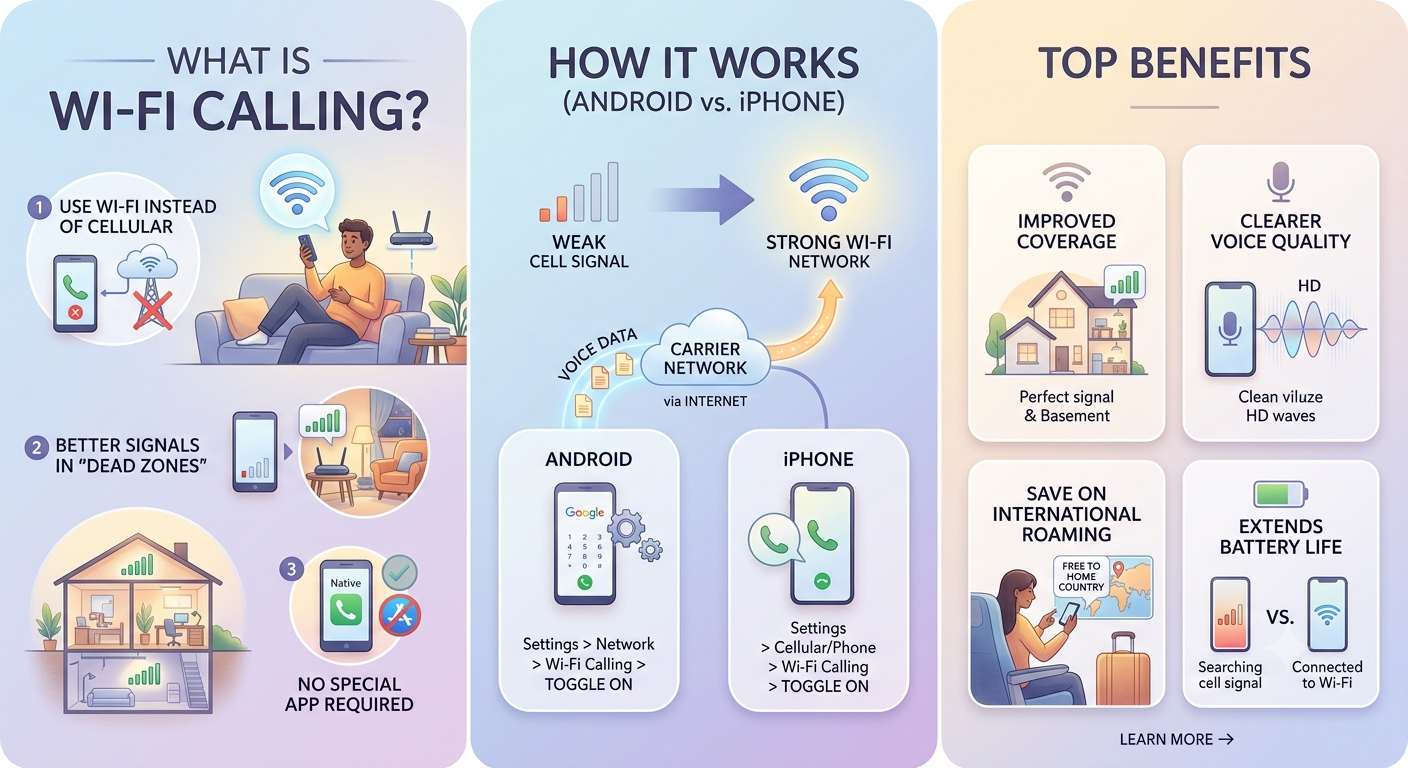
What is WiFi calling? It is a service that routes voice calls and text messages (SMS) over a Wi-Fi network instead of (or in addition to) your mobile carrier’s cellular signal. Also known as VoWiFi (Voice over Wi-Fi), it uses your existing phone number and integrates seamlessly with your device’s native calling app no extra apps needed.
When enabled, your phone detects poor cellular coverage and automatically switches to Wi-Fi for calls. The call quality often matches or exceeds traditional cellular calls if your Wi-Fi connection is strong. It supports both outgoing and incoming calls, plus texting in many cases.
The purpose of Wi-Fi calling is straightforward: to improve coverage and reliability in areas where mobile signals are weak or nonexistent, without needing additional hardware like signal boosters.
How WiFi Calling Works on Android and iPhone
What is WiFi calling on Android? Most modern Android devices, including Samsung Galaxy phones, support it. The phone uses your Wi-Fi internet to connect to your carrier’s servers, which then route the call as usual.
What is WiFi calling Samsung specifically? Samsung devices have straightforward toggles in the Connections settings. It works similarly across other Android brands, though the exact menu path may vary slightly (e.g., under Network & Internet or SIM settings).
What is WiFi calling on iPhone? Apple calls it Wi-Fi Calling and has supported it for years. It appears in the Cellular settings and shows a “Wi-Fi” indicator in the status bar when active.
In both ecosystems, the feature requires:
- A compatible phone and carrier plan.
- An active SIM or eSIM.
- A stable Wi-Fi connection.
- Often, registration of your emergency address with the carrier.
WiFi Calling on Android: Step-by-Step Enablement
For what is wifi calling on android users wanting to activate it:
- Open Settings.
- Go to Connections (or Network & Internet) > Wi-Fi Calling.
- Toggle it on.
- You may need to confirm your location for emergency services (E911).
How to enable WiFi calling on Android often includes preference options like “Wi-Fi preferred” or “Mobile preferred,” letting you control when the switch happens.
On Samsung: Check Settings > Connections > Wi-Fi Calling for quick access and additional preferences.
WiFi Calling on iPhone: Simple Activation
What is wifi calling iphone setup is user-friendly:
- Go to Settings > Cellular (or Mobile Data).
- Tap the line/SIM you want to use.
- Toggle Wi-Fi Calling on.
- Confirm your address if prompted.
What is wifi calling on iPhone shines with seamless integration calls transition smoothly between Wi-Fi and cellular as you move.
WiFi Calling in the UK: Carrier Support and Considerations
What is wifi calling uk users should know that major carriers like EE, Vodafone, O2, and Three support it.
What is wifi calling ee specifically offers reliable coverage, especially useful in rural or indoor spots across Britain. Check your carrier’s app or website for compatibility, as support can depend on your plan and device.
In the UK, Wi-Fi calling counts toward your regular call minutes and texts, making it convenient for everyday use.
Benefits of WiFi Calling
- Improved Coverage: Perfect for dead zones, basements, or travel.
- Better Call Quality: Strong Wi-Fi often provides clearer audio than spotty cellular.
- Battery Savings: Your phone stops constantly searching for weak signals.
- No Extra Cost: Usually free and uses your existing plan (though data usage on public Wi-Fi is separate).
- Seamless Experience: Works with your regular phone number.
Is Wi-Fi calling free? In most cases, yes, within your plan’s allowances for domestic calls. International rates may still apply.
Disadvantages of WiFi Calling
While useful, it’s not perfect. What are the disadvantages of WiFi calling?
- Dependency on Wi-Fi: Poor or congested networks can cause drops or poor quality.
- Emergency Calls: May have limitations; always verify E911 registration.
- Public Wi-Fi Risks: Security concerns on open networks (use VPN if needed).
- Battery/Heat: Heavy use on weak Wi-Fi might drain battery faster than expected.
- Carrier/Device Compatibility: Not universal older phones or certain plans may lack support.
Should you have Wi-Fi calling on or off? Keep it on for convenience if you have reliable home/office Wi-Fi. Turn it off on public networks or if you notice issues.
Comparison Table: WiFi Calling on Android vs iPhone
| Feature | Android (incl. Samsung) | iPhone |
|---|---|---|
| Activation Path | Settings > Connections > Wi-Fi Calling | Settings > Cellular > Wi-Fi Calling |
| Preferences | Wi-Fi preferred, Mobile preferred | Automatic switching |
| Indicators | Notification or status bar | “Wi-Fi” in status bar |
| Texting Support | Generally yes (SMS) | Yes |
| UK Carrier Examples | EE, Three, etc. | EE, Vodafone, O2, Three |
| Ease for Beginners | Straightforward with options | Very simple and integrated |
This table highlights why both platforms make what is wifi calling accessible.
Common Use Cases and Tips
- Home or Office: Ideal where cellular is weak indoors.
- Travel: Use hotel Wi-Fi abroad to avoid roaming fees (check carrier policies).
- Samsung Specifics: What is wifi calling in samsung often includes quick toggles in the notification panel.
What is wifi calling reddit discussions frequently praise it for rural areas but warn about public Wi-Fi security.
Tips:
- Test call quality on your home network first.
- Update your phone’s software for best performance.
- Monitor data usage if on limited plans (though calls themselves use minimal data).
- For international use, confirm with your provider.
FAQ: Frequently Asked Questions About WiFi Calling
1. What is the purpose of Wi-Fi calling?
It allows calls and texts over Wi-Fi when cellular signal is poor, improving reliability without extra apps or costs.
2. Is Wi-Fi calling free?
Usually yes for standard calls within your plan. It doesn’t consume cellular data but relies on your Wi-Fi connection.
3. Should you have Wi-Fi calling on or off?
Leave it on for better coverage in most home or office scenarios. Turn off on insecure public networks.
4. What are the disadvantages of WiFi calling?
It depends on Wi-Fi quality, may have emergency service limits, and can pose security risks on open networks.
5. How do I enable WiFi calling on Samsung or Android?
Go to Settings > Connections > Wi-Fi Calling and toggle on. Confirm emergency address.
6. What is WiFi calling on iPhone and how does it differ?
It’s built into iOS for seamless use. Activate via Cellular settings very straightforward.
7. Does WiFi calling work internationally?
It can help avoid roaming charges for calls back home, but check your carrier’s specific rules.
Conclusion: Is WiFi Calling Right for You?
What is WiFi calling on Android and iPhone boils down to a smart, convenient way to stay connected despite cellular limitations. With strong adoption across carriers like EE in the UK and easy setup on both platforms, it’s a feature worth enabling for most users. Weigh the pros of better coverage against the cons of Wi-Fi dependency, and test it in your common environments.