



In the world of automotive maintenance, few tools empower owners like forscan software. If you’re driving a Ford F-150, a Mazda CX-5, or a Lincoln Navigator, you’ve likely faced the frustration of dashboard warning lights, quirky factory settings, or the high cost of dealership diagnostics. Enter FORScan a powerful, user-friendly diagnostic and customization tool that’s revolutionizing how enthusiasts and everyday drivers interact with their vehicles.
Why does this matter? With rising repair costs and the push toward DIY auto care, forscan software lets you read error codes, monitor live data, and even tweak hidden features without handing over your keys (or hundreds of dollars) to a mechanic. It’s not just for gearheads; it’s a practical solution for anyone wanting to extend their vehicle’s life and personalize their ride. In this ultimate guide, we’ll dive deep into what FORScan is, how to get started, and why it’s a must-have for Ford, Mazda, and Lincoln owners. Whether you’re searching for a FORScan download or curious about the FORScan app, we’ve got you covered.
What Is FORScan Software?
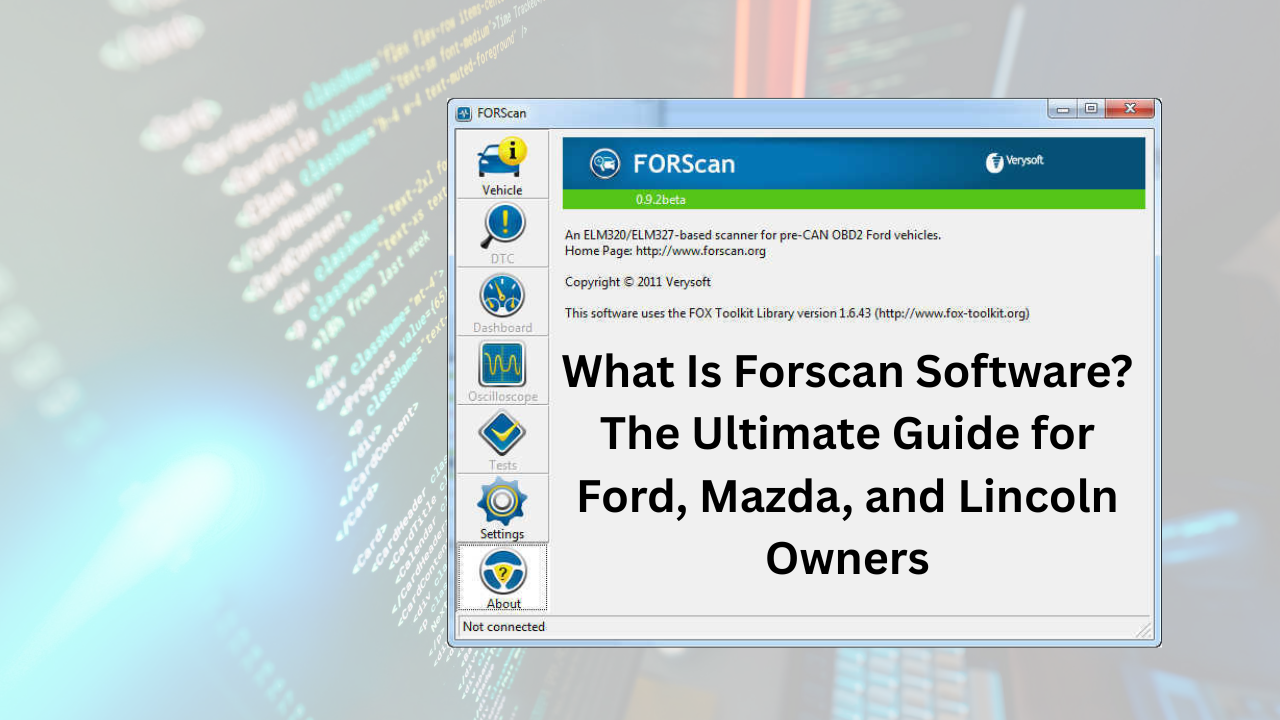
At its core, forscan software is an advanced diagnostic scanner tailored specifically for Ford, Mazda, Lincoln, and Mercury vehicles. Unlike generic OBD-II readers that offer basic code reading, FORScan taps into the proprietary protocols these brands use, unlocking deeper access to your car’s electronic control units (ECUs). Developed by a community of enthusiasts, it’s essentially a bridge between your laptop or smartphone and your vehicle’s onboard computer, allowing you to diagnose issues, perform tests, and make configuration changes.
Think of it this way: Your car is like a smartphone with thousands of hidden apps. A standard OBD-II tool might show you a vague “check engine” alert, but FORScan reveals the exact module at fault say, the transmission control module and lets you reset it or adjust parameters. This level of insight can prevent minor glitches from becoming major headaches, saving you time and money.
FORScan stands out because it’s free to download and use for basic functions, with optional upgrades for advanced tweaks. It’s particularly popular among truck owners tweaking their F-150s or SUV drivers optimizing fuel efficiency in their Explorers. If you’ve ever wondered, “What is FORScan software?” it’s the Swiss Army knife for your dashboard.
A Brief History of FORScan: From Enthusiast Tool to Essential Software
FORScan’s roots trace back to the early 2000s, born from the frustrations of Ford owners dealing with the brand’s complex CAN bus systems. The project started as an open-source initiative on forums like Ford Truck Enthusiasts, where DIYers shared scripts to decode proprietary Ford diagnostics. By 2013, it evolved into a full-fledged application, with the official Forscan website (forscan.org) launching to centralize downloads and support.
Fast-forward to today, and FORScan has matured into a robust ecosystem. The Windows version handles heavy-duty programming, while mobile apps like FORScan Lite bring diagnostics to your pocket. Community-driven updates keep it ahead of Ford’s evolving tech, like the 2025 model year’s hybrid systems. This evolution reflects a broader trend: As vehicles become more computerized, tools like forscan software democratize access to what was once dealer-only territory.
Key Features of FORScan Software
What sets forscan software apart? Its feature set goes beyond code reading, offering tools that feel like having a mini-dealership in your garage. Here’s a breakdown:
Advanced Diagnostics and Code Reading
FORScan scans all modules up to 20 or more in modern Fords detecting trouble codes that generic scanners miss. It reads live sensor data, like coolant temperature or oxygen levels, in real-time graphs, helping you spot intermittent issues before they strand you. For instance, if your Lincoln’s climate control acts up, FORScan pinpoints the HVAC module without guesswork.
Service Procedures and Tests
Need to bleed brakes or test injectors? FORScan runs manufacturer-specific procedures, guiding you through steps with on-screen prompts. This is invaluable for maintenance like ABS bleeding on a Mazda3, ensuring air-free lines for safe braking.
Configuration and Programming
The crown jewel: Customizing your ride. With an extended license, you can enable hidden features or disable annoyances. More on popular mods later, but suffice to say, it’s a game-changer for personalization.
Oscilloscope and Data Logging
Advanced users love the built-in oscilloscope for waveform analysis and data logging for long-term monitoring perfect for tuning a Ford Mustang’s performance.
These features make forscan software indispensable, blending pro-level diagnostics with user-friendly interfaces.
Compatibility: Which Vehicles Does FORScan Support?
Not every car plays nice with forscan software, but its focus on Ford-group brands ensures broad coverage. It works with vehicles using ELM327 or J2534 adapters, connecting via USB, Bluetooth, or Wi-Fi.
Here’s a quick compatibility overview in table form:
| Brand | Supported Model Years | Key Notes |
|---|---|---|
| Ford | 1996–2025+ | Full support for F-150, Mustang, Explorer; limited functions on 2021–2025 hybrids. Best-effort for 2025+ models. |
| Mazda | 1996–2022 (up to 6th gen) | Excellent for CX-5, Mazda3; partial or no support for 7th-gen (e.g., CX-30, MX-30). |
| Lincoln | 1996–2025+ | Covers Navigator, Aviator; enhanced for luxury modules like adaptive cruise. |
| Mercury | 1996–2011 | Legacy support for Grand Marquis, Milan; fading but still useful. |
This targeted support means forscan software shines where it matters most, avoiding the bloat of universal tools.
How to Download FORScan Software: A Step-by-Step Guide
Getting forscan software up and running is straightforward, and yes, you can download it for free. Head to the Forscan website (forscan.org) for the latest files no shady third-party sites needed.
FORScan Download for Windows
The flagship version is for Windows (2000 and up). As of November 2025, grab FORScan latest version download v2.3.68 from forscan.org/download/FORScanSetup2.3.68.release.exe. Installation is a quick EXE file under 50MB. It includes a 2-month trial for full features.
For older builds like ForScan 2.3.66 download, they’re archived on the site, but stick to the newest for bug fixes and new vehicle support.
FORScan App for Mobile Devices
Wondering, “Is there FORScan for Android?” Absolutely. Download FORScan Android Lite v1.5.28 from forscan.org/download_lite_ng.php (independent edition) or Google Play. iOS users get it via the App Store: apps.apple.com/us/app/forscan-lite-for-ford-mazda/id892347083.
FORScan Lite is a slimmed-down version for diagnostics on the go, sans programming. It’s free with in-app purchases for extras. Note: Due to past Google Play delistings, sideload if needed always from the official site.
Where do you get FORScan software? Straight from forscan.org. Avoid torrents; they’re rife with malware.
Understanding the FORScan License: Free vs. Extended
Can I download FORScan for free? Yes the base app is gratis, covering diagnostics and basic reads. But for programming (e.g., enabling features), you’ll need an extended license after the 2-month trial.
Licenses cost around $10–$50 via partners like IOBD.IO or AKM Software, due to payment glitches on the main site (tied to international sanctions). Generate a free trial key at forscan.org/support/prepare_trial_el_request.php. It’s worth it for one-time tweaks like disabling auto start-stop.
No license? No problem for code clearing. But for FORScan license holders, the sky’s the limit.
Setting Up FORScan: Hardware and Installation Tips
Ready to dive in? You’ll need an OBD-II adapter OBDLink EX ($60 on Amazon) is gold-standard for its MS-CAN/HS-CAN switching.
- Install Drivers: Plug in your adapter; Windows auto-detects most.
- Launch FORScan: Connect to your car’s OBD port (under the dash).
- Scan: Hit “Scan” to map modules expect 10–30 seconds.
- Explore: Dive into PIDs or configs.
Troubleshooting? Ensure Bluetooth pairing for wireless adapters. For FORScan Android, grant location permissions for BLE connections.
Popular FORScan Modifications for Ford, Mazda, and Lincoln Owners
One of forscan software‘s biggest draws? Unlocking hidden gems. Ford owners rave about these tweaks, all doable in “Easy Mode” with minimal risk.
- Disable Auto Start-Stop: Kills the fuel-saving feature that restarts your engine at lights huge for stop-and-go commuters.
- Bambi Mode: Activates high beams and fogs together for off-road visibility on F-150s or Raptors.
- No More Double Honk: Silences the lock-chirp annoyance.
- Tire Size Adjustment: Recalibrates speedometer after wheel upgrades.
- Seatbelt Chime Off: For track days or long-haul trips.
- Enable Traffic Sign Recognition: Adds speed limit alerts on Mazdas.
- Global Windows Up: Roll up all windows with key fob.
These mods enhance usability without voiding warranties (check your manual). Forums like F150Forum.com have spreadsheets for model-specific codes. Always back up your ECU first FORScan makes it easy.
Pros and Cons of FORScan Software
Like any tool, forscan software has trade-offs. Here’s a balanced view:
| Aspect | Pros | Cons |
|---|---|---|
| Cost | Free download; affordable licenses | Extended features require payment |
| Ease of Use | Intuitive interface; community tutorials | Steep learning curve for programming |
| Versatility | Deep Ford/Mazda access; mobile options | Brand-specific; no universal support |
| Reliability | Frequent updates; stable on supported OS | Adapter quality varies; occasional bugs |
| Value | Saves on dealer visits (e.g., $100+ diag) | Risk of bricking modules if misused |
FAQ: Common Questions About FORScan Software
Can I Download FORScan for Free?
Yes! The core forscan software is free from forscan.org, including a 2-month trial for advanced features. Basic diagnostics cost nothing.
Where Do You Get FORScan Software?
Download directly from the Forscan website at forscan.org. For FORScan Android, use the Lite app from Google Play or the site.
What Is FORScan Software?
FORScan software is a diagnostic and customization tool for Ford, Mazda, and Lincoln vehicles, offering code reading, live data, and module programming via OBD adapters.
Is There FORScan for Android?
Definitely FORScan Android Lite v1.5.28 handles mobile diagnostics. It’s lighter than the Windows version but perfect for on-the-go scans.
What’s the Latest FORScan Version Download?
As of November 2025, snag FORScan latest version download v2.3.68 for Windows from forscan.org. Check the site for updates.
Do I Need a FORScan License?
Not for basics, but yes for programming. Trials are free; full FORScan license runs $10–$50 via partners.
What’s FORScan Lite?
FORScan Lite is the mobile-optimized version for iOS and Android, focusing on diagnostics without full programming ideal for quick checks.
Conclusion: Unlock Your Vehicle’s Potential with FORScan Today
FORScan software isn’t just a diagnostic tool it’s a gateway to smarter, more personalized ownership for Ford, Mazda, and Lincoln drivers. From clearing codes to enabling game-changing mods, it puts control in your hands, cutting costs and boosting satisfaction.
Ready to start? Download your free FORScan download from forscan.org, grab a compatible adapter, and join the community on forums like Reddit’s r/FORScan. Your next drive could be smoother, safer, and way more fun what are you waiting for? Share your mods in the comments below!