









Building a beautiful website is only half the battle getting it found by potential customers is where the real work begins. A Squarespace website offers stunning design and user-friendly tools, but without proper optimization, even the best-looking site can remain invisible in search results. Effective SEO helps drive organic traffic, build credibility, and grow your business sustainably.
This guide provides practical Squarespace SEO tips tailored for beginners and experienced users alike. Whether you’re launching a new site or optimizing an existing one, these strategies will help improve your visibility on Google and other search engines.
Why SEO Matters for Your Squarespace Website
Search engines are the primary way most people discover new businesses, blogs, and services online. A well-optimized Squarespace website can rank higher for relevant queries, attracting qualified visitors without ongoing ad spend.
Squarespace handles many technical foundations automatically clean code, mobile responsiveness, and SSL security but content, structure, and ongoing efforts determine your success. In 2026, with AI-powered search and evolving algorithms, focusing on user experience and quality content is more important than ever.
Getting Started: Squarespace Basics for SEO
Before diving into advanced tips, ensure your foundation is solid.
Squarespace login and dashboard access let you control SEO settings easily. From there, you can manage Squarespace templates, which are generally SEO-friendly with clean URLs and structured layouts.
Squarespace pricing plans (starting around $19/month) include essential SEO tools. Annual plans often come with a free Squarespace domain for the first year, which is better for branding and SEO than subdomains.
Squarespace domains and Squarespace website builder features make setup straightforward. Use a custom domain for professionalism and better rankings.
On-Page SEO Optimization on Squarespace
Focus on elements you control directly:
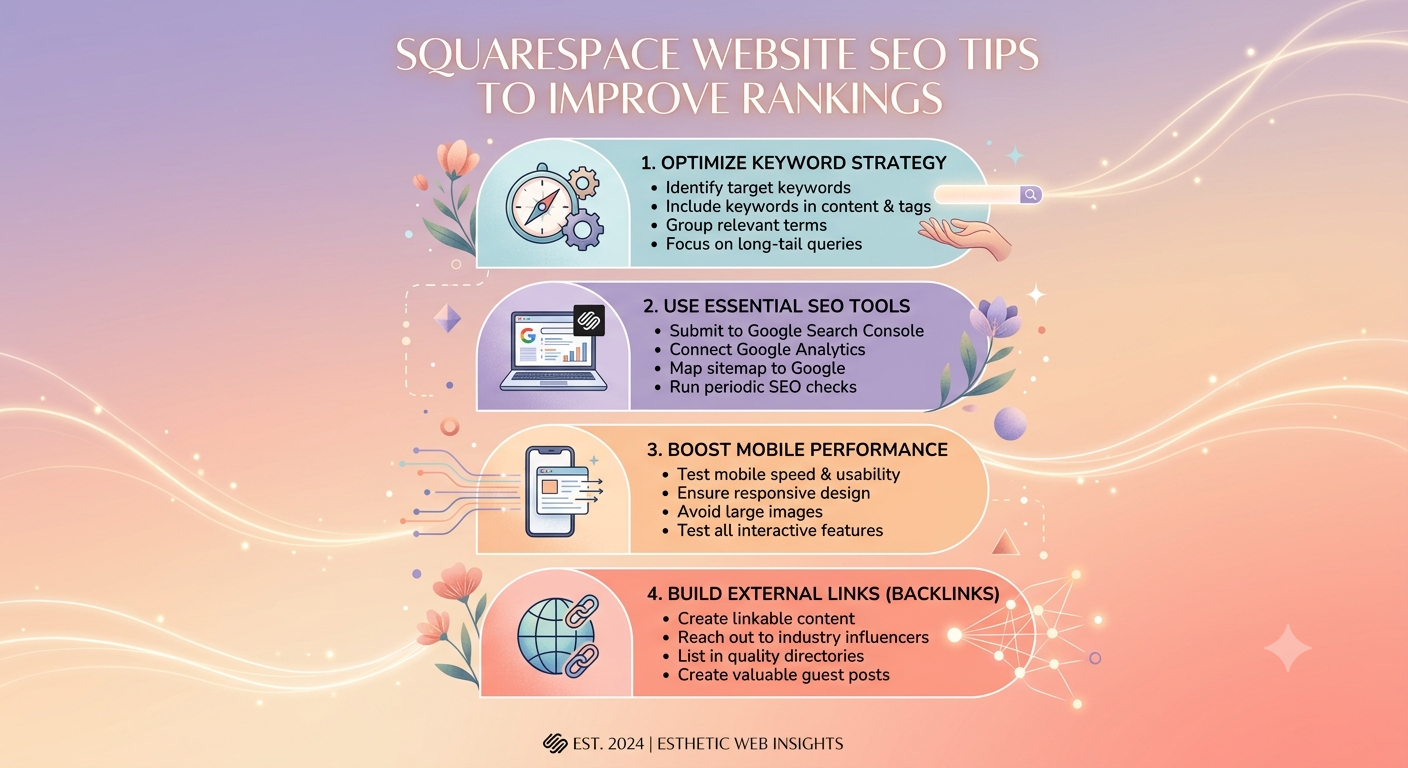
- Page Titles and Meta Descriptions: Customize unique, keyword-rich titles (under 60 characters) and descriptions (50-300 characters) for every page. Avoid keyword stuffing write for humans first.
- Headings and Content Structure: Use H1 for main titles, H2/H3 for subsections. Create high-quality, original content that answers user questions.
- Image Optimization: Add descriptive alt text, compress images, and use relevant filenames. Squarespace handles responsive images well.
- URL Structure: Keep URLs short, readable, and keyword-inclusive. Squarespace generates clean slugs automatically.
- Internal Linking: Connect related pages and blog posts to help search engines understand your site structure and improve crawlability.
Technical SEO Tips Specific to Squarespace
Squarespace automates much of the technical work, but verify and enhance it:
- Submit Sitemap and Request Indexing: Connect to Google Search Console and Bing Webmaster Tools. Submit your sitemap and request indexing for key pages.
- Mobile-Friendliness: All modern Squarespace templates are responsive. Test with Google’s Mobile-Friendly Test tool.
- Site Speed: Optimize by limiting large blocks, using Squarespace’s built-in performance features, and choosing fast-loading templates.
- Structured Data: Add schema markup where possible (e.g., for FAQs, articles, or local business info) to enhance rich results.
- HTTPS and Security: Automatically enabled on Squarespace ensure it’s active.
Content Strategy for Better Rankings
Create content that serves your audience:
- Blog regularly with in-depth posts targeting specific keywords.
- Use Squarespace’s blogging tools for easy publishing and categorization.
- Focus on E-E-A-T (Experience, Expertise, Authoritativeness, Trustworthiness) by including author bios, sources, and updates.
- Optimize for AI search by providing unique insights beyond simple answers.
Local SEO and Ecommerce Considerations
For service businesses, claim and optimize Google Business Profile integration. Use location pages if applicable.
Ecommerce sites benefit from optimized product descriptions, categories, and reviews. Squarespace website builder ecommerce features support this well.
Squarespace vs Competitors: SEO Perspective
Wix vs Squarespace is a common comparison. Both platforms offer strong SEO, but Squarespace excels with cleaner code and automatic optimizations, while Wix provides more drag-and-drop flexibility that can sometimes lead to bloat if not managed carefully. Squarespace often edges out for design-focused sites.
Who is better, GoDaddy or Squarespace? Squarespace generally performs better for SEO due to superior templates and built-in tools, while GoDaddy suits very basic needs.
Table: Key Squarespace SEO Checklist
| SEO Element | Action on Squarespace | Impact on Rankings |
|---|---|---|
| Site Title & Description | Customize in Settings > SEO | Improves click-through rates |
| Page Meta | Edit per page in Page Settings | Targets specific keywords |
| Images | Add alt text and optimize files | Better image search visibility |
| Blog Content | Regular posts with headings & keywords | Builds topical authority |
| Sitemap Submission | Via Google Search Console | Faster indexing |
| Mobile Optimization | Use responsive templates | Essential for mobile-first indexing |
Advanced Tips and Tools
- Monitor performance with Squarespace Analytics and Google tools.
- Build backlinks through quality content and outreach.
- Use Squarespace promo code or Squarespace discount code offers when starting to manage costs.
- Consider third-party extensions for deeper SEO insights if needed.
Is Squarespace good for making a website? Yes its balance of design, ease, and SEO capabilities makes it excellent for professionals and small businesses.
Common Challenges and Solutions
- Slow indexing: Submit URLs manually in Search Console.
- Duplicate content: Use canonical tags where necessary.
- Limited plugins: Rely on built-in features and custom code blocks sparingly.
Is the Squarespace website free? No, after the trial it requires a paid plan, but the investment supports reliable hosting and tools. How much does it cost to own a website on Squarespace? Plans range from basic to advanced, plus domain costs after the first year.
FAQ: Squarespace Website Questions
1. Is the Squarespace website free?
No. A 14-day trial is available, but ongoing use requires a subscription starting around $19/month.
2. Who is better, GoDaddy or Squarespace?
Squarespace is generally superior for design, user experience, and SEO, while GoDaddy may suit ultra-simple sites or domain-focused users.
3. Is Squarespace good for making a website?
Absolutely. It offers professional templates, built-in SEO, and ecommerce tools ideal for portfolios, blogs, and stores.
4. How much does it cost to own a website on Squarespace?
Website plans start at approximately $19–$49/month (billed annually), plus domain renewal fees after the first free year.
5. How do I get a Squarespace domain?
Purchase or connect via the Domains panel. Annual plans include one free custom domain for the first year.
6. What are the best Squarespace templates for SEO?
Choose clean, fast-loading designs. Most modern templates perform well focus on content over flashy effects.
7. Does Squarespace support advanced SEO?
Yes, with solid built-in tools. Combine with external practices like quality content and backlinks for best results.
Conclusion: Start Optimizing Your Squarespace Website Today
Implementing these Squarespace website SEO tips can significantly boost your search rankings and organic traffic. Focus on quality content, technical basics, and continuous improvement rather than chasing shortcuts.