


Starting a business in the UK brings excitement and plenty of administrative tasks. Managing finances, tracking expenses, invoicing clients, and staying compliant with HMRC requirements like Making Tax Digital (MTD) can feel overwhelming for new sole traders or small business owners. This is where QuickBooks UK shines as a user-friendly, cloud-based solution designed to simplify accounting.
Whether you’re self-employed or running a small team, this QuickBooks UK setup guide for beginners walks you through everything step-by-step. You’ll learn how to get started with QuickBooks Online, connect your accounts, and make the most of its features for efficient bookkeeping.
Why Choose QuickBooks for Your UK Business?
QuickBooks, from Intuit, is one of the most popular accounting platforms worldwide and fully supports UK-specific needs. It handles VAT, MTD submissions, payroll, and Self Assessment elements effectively.
Key advantages include automated bank feeds, real-time reports, mobile apps, and expert support. It’s HMRC-recognised, making compliance straightforward. Many beginners appreciate the intuitive interface and scalable plans that grow with their business.
QuickBooks Online vs Other Options
QuickBooks Online is the primary cloud version for most UK users. There’s also QuickBooks Self Employed, tailored for sole traders with simplified tax tracking.
Intuit QuickBooks offers robust integrations, while desktop versions exist but are less common now due to cloud preferences. For most beginners, QuickBooks Online provides the best balance of features and accessibility.
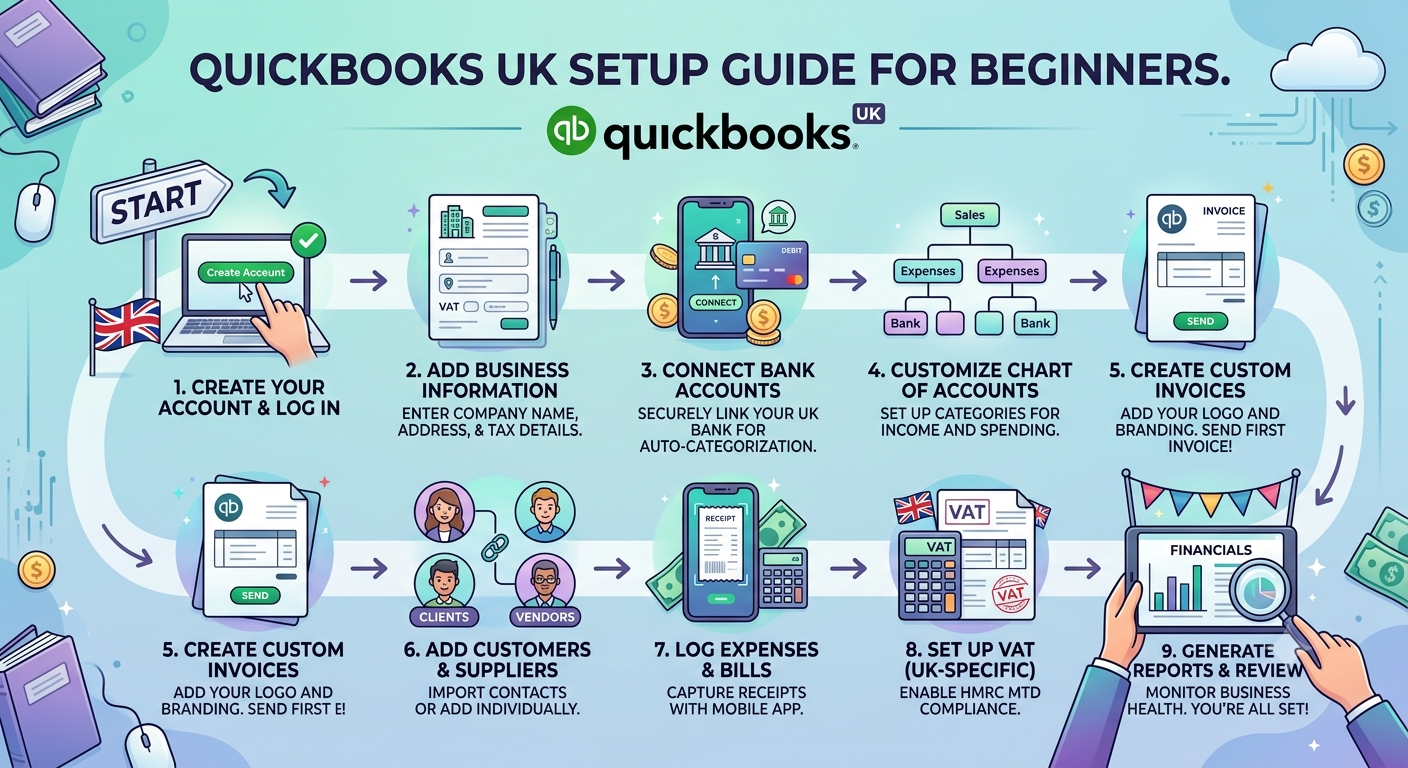
Step-by-Step QuickBooks UK Setup Guide
1. Signing Up and QuickBooks Login UK
Visit the official QuickBooks UK site and select a plan. You’ll create an Intuit account for QuickBooks login.
- Go to quickbooks.intuit.com/uk
- Choose your plan (trial often available)
- Enter business details and email
- Verify your account
For QuickBooks Online login, use your Intuit credentials. The same applies for QuickBooks UK login across devices. Save your details securely or use password managers.
2. Choosing the Right Plan
QuickBooks UK offers several tiers:
- Sole Trader / Self Employed: Great for freelancers.
- Simple Start: Basic invoicing and VAT.
- Essentials: Adds bill management and multi-user.
- Plus and Advanced: Inventory, projects, and more.
How much does QuickBooks cost in the UK? Plans start around £10-£16/month (with promotions like 50% off for initial months) plus VAT. Check current pricing as it can vary.
3. Setting Up Your Company Profile
After QuickBooks sign up:
- Enter business name, address, and contact info.
- Add your National Insurance Number and tax details.
- Set your financial year and VAT scheme (flat rate or standard).
- Connect to HMRC for seamless MTD submissions if applicable.
This foundational step ensures accurate tax calculations.
4. Connecting Bank Accounts and Importing Data
Bank feeds are a game-changer:
- Go to Banking > Connect Account.
- Search for your UK bank (most major ones integrate).
- Authorise the connection for automatic transaction imports.
For older data, upload CSV statements or manually enter transactions. QuickBooks Self Employed makes mileage and receipt tracking easy via the mobile app.
5. Customising Chart of Accounts and Categories
Review the default categories and add custom ones relevant to your business (e.g., specific expense types for deductions). Set up rules to auto-categorise recurring transactions, saving time on bookkeeping.
Key Features for Beginners in QuickBooks UK
- Invoicing: Create professional invoices, set recurring billing, and track payments.
- Expense Tracking: Snap receipts with the app; auto-categorise.
- VAT and MTD: Direct submission to HMRC.
- Reports: Profit & Loss, Balance Sheet, and tax-ready summaries.
- Payroll: Add-ons for payslips and employee management (QuickBooks payslips login access).
How does QuickBooks UK work? It centralises all financial data in the cloud, accessible anytime via web or app.
QuickBooks Self Employed Setup Specifics
For sole traders:
- Choose the Self Employed plan during QuickBooks UK sign up.
- Set tax profile (income tax, Class 2/4 NI).
- Track quarterly payments and deductions.
- Use the app for on-the-go expense logging.
This version simplifies Self Assessment preparation significantly.
Comparison Table: QuickBooks UK Plans
| Plan | Best For | Key Features | Approx. Monthly Cost (ex. VAT, promotional) | Users |
|---|---|---|---|---|
| Self Employed / Sole Trader | Freelancers | Tax estimates, mileage, basic invoicing | £10 | 1 |
| Simple Start | Small startups | Invoicing, VAT, bank reconciliation | £16 | 1 |
| Essentials | Growing businesses | Bills, multi-currency, 3 users | £33 | 3 |
| Plus | Inventory-heavy | Projects, stock tracking | £47 | 5 |
| Advanced | Larger teams | Custom reporting, automation | Higher | 25+ |
Prices are approximate and subject to change always verify on the site.
Common Setup Challenges and Solutions
- Bank connection issues: Ensure your bank supports Open Banking.
- Data migration: Start fresh or import gradually.
- Learning curve: Use Intuit’s free tutorials and onboarding sessions.
- MTD compliance: QuickBooks handles digital links to HMRC.
Is QuickBooks used in the UK? Absolutely it’s popular among accountants and businesses for its reliability.
Advanced Tips After Initial Setup
- Set up recurring transactions and rules.
- Invite your accountant for collaborative access.
- Explore integrations with payment gateways or e-commerce.
- Regularly review reports to understand cash flow.
- Use the mobile app for real-time management.
For QuickBooks download, note that the online version is browser-based, with desktop apps available for some features.
FAQ: QuickBooks UK for Beginners
1. How much does QuickBooks cost in the UK?
Plans range from around £10/month for Sole Trader options, with discounts for new users. Check for current promotions.
2. Is QuickBooks used in the UK?
Yes, it’s widely used and HMRC-recognised for MTD compliance.
3. What’s replacing QuickBooks?
No major replacement it’s evolving with cloud updates. Some consider alternatives like Xero, but QuickBooks remains a leader.
4. How does QuickBooks UK work?
It automates bookkeeping, connects to banks, and simplifies tax submissions through an easy online platform.
5. How do I do QuickBooks UK login?
Use your Intuit account at the login page. Separate product options may appear for QuickBooks Self Employed.
6. Is there QuickBooks UK login free?
Trials and limited free tiers exist, but full features require a subscription.
7. How to access QuickBooks payslips login?
Through the Payroll add-on in supported plans for employee management.
Conclusion: Launch Your Accounting Journey with Confidence
Setting up QuickBooks UK doesn’t have to be complicated. Follow this guide to handle QuickBooks login, company setup, bank connections, and daily tasks efficiently. The platform’s automation and UK compliance features free you to focus on growing your business.