






In today’s fast-paced world, small businesses, freelancers, and market traders need simple, reliable ways to accept payments without the hassle of traditional bank terminals. Enter SumUp, a leading fintech solution that has transformed how merchants handle card transactions. Whether you’re a new coffee van owner, a craft seller at weekend markets, or a salon professional, this SumUp card reader guide for new users will walk you through everything you need to know to get started confidently.
SumUp makes accepting payments accessible with affordable hardware, a user-friendly app, and transparent SumUp fees. No long contracts, no expensive rentals just pay-as-you-go convenience that scales with your business. This guide covers setup, features, costs, login processes, and tips to maximize value, helping new users avoid common pitfalls and start accepting payments quickly.
What Is SumUp and What Is SumUp Used For?
What is SumUp used for? At its core, SumUp is a mobile payment platform designed for small and medium-sized businesses. It allows merchants to accept debit and credit cards (including contactless, chip & PIN, and Apple Pay/Google Pay) via portable card readers or even directly through a smartphone with Tap to Pay.
Beyond basic transactions, SumUp offers tools for invoicing, reporting, inventory management, and business banking features. It’s particularly popular in the UK for its ease of use in mobile or low-volume scenarios where traditional card machines would be overkill.
Is SumUp a real bank? No, SumUp is not a traditional bank but an electronic money institution (EMI) authorized and regulated by the Financial Conduct Authority (FCA) in the UK. It provides payment services and has expanded into business accounts with Mastercard debit cards, offering features like fast transfers. Funds are safeguarded, but it doesn’t offer full banking services like loans or overdrafts in the same way high-street banks do.
The company was co-founded by Daniel Klein (often referenced as a key leader), and it has grown into a global player serving millions of merchants.
Getting Started: SumUp Login and Account Setup
New users often search for “sumup login” or “sumup login uk“. Here’s how to begin:
- Visit the official SumUp website (sumup.co.uk for UK users) and sign up with your email and business details.
- Download the free SumUp app from the App Store or Google Play.
- Complete verification usually quick for sole traders, with standard ID checks.
Once set up, use your credentials for sumup login. The app is intuitive, letting you process payments, view reports, and manage your account on the go. For sumup login UK users, the process is streamlined with local support.
Pro Tip: Enable two-factor authentication for security right after your first login.
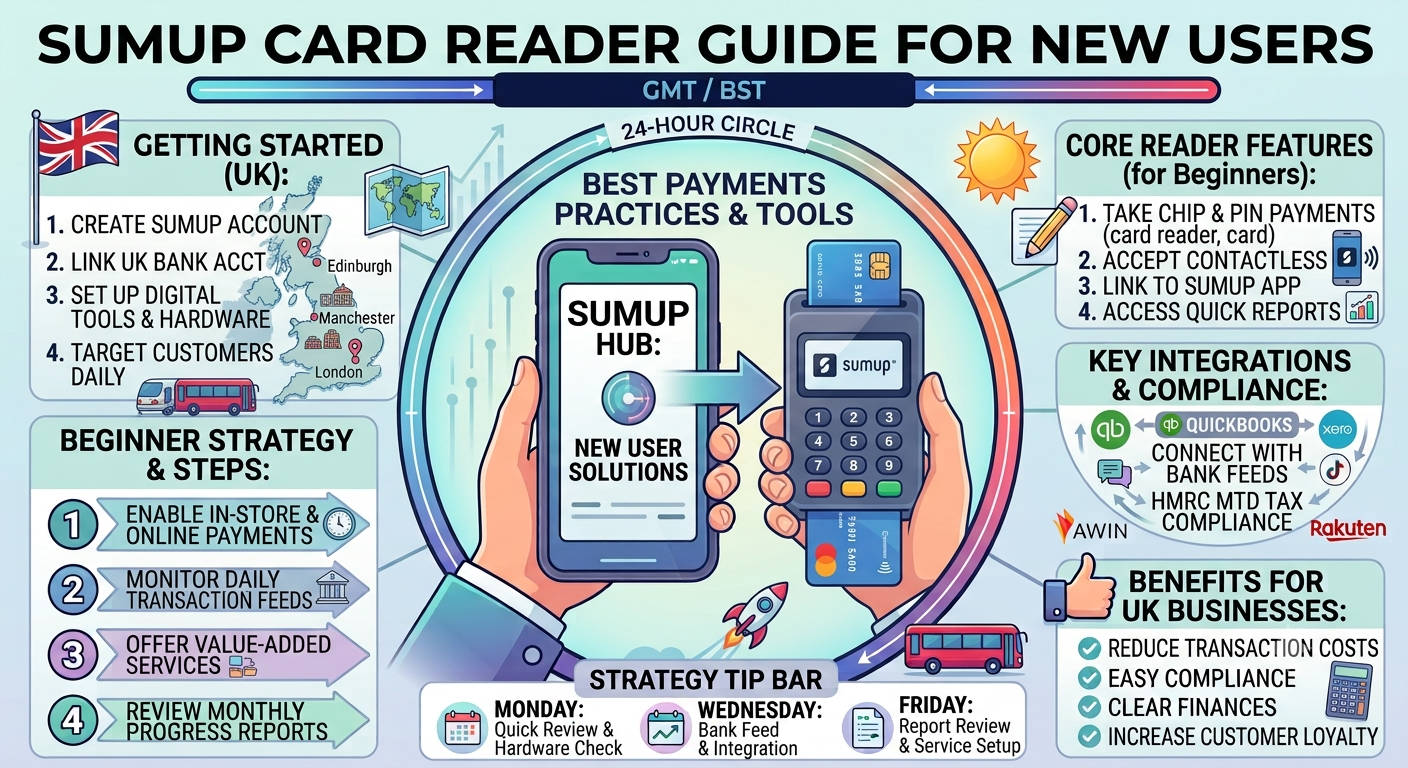
Choosing and Setting Up Your SumUp Card Reader
SumUp offers several options in its sumup card reader lineup:
- SumUp Air: Compact Bluetooth reader pairs with your phone.
- SumUp Solo: Standalone with built-in SIM and printer options (great for SumUp solo users who want independence from a smartphone).
- SumUp Solo Lite: Affordable entry-level model.
- Tap to Pay: No hardware needed just your NFC-enabled phone.
Step-by-Step Setup Guide for New Users
- Unbox and Charge: Ensure your sumup card machine (or reader) is fully charged.
- Turn On: Press the power button. For Solo models, select language and connect to Wi-Fi or use the included SIM.
- Connect via App: Open the SumUp app, go to profile > Card reader > Connect. Match the 3-digit code on the app with the one on your device.
- Test Transaction: Enter a small test amount (e.g., £1) to confirm everything works.
The entire process typically takes under 10 minutes. Solo devices offer more standalone functionality, while Air models keep costs low by leveraging your phone’s connectivity.
Understanding SumUp Fees and Pricing
Transparency in costs is a big draw. SumUp fees are straightforward:
| Plan | Transaction Fee | Monthly Cost | Best For |
|---|---|---|---|
| Pay-as-you-go | 1.69% | £0 | Variable or low-volume sales |
| Payments Plus | 0.99% | £19 | Higher volume (£3k+/month) |
| Custom | Bespoke | Varies | £10k+ monthly processing |
No monthly minimums or hidden charges. You only pay when you transact. Special 0% fees apply when customers pay with a SumUp personal card. Payouts are fast often next day.
How much does SumUp cost per month? It can be £0 with pay-as-you-go, making it ideal for startups.
Key Features: SumUp App, Business Tools, and More
The SumUp app is central. It handles payments, sales reports, customer management, and invoicing. Advanced users appreciate POS integrations and loyalty programs.
SumUp card machine options integrate seamlessly, and the SumUp Business Account adds banking-like features with a Mastercard for spending and instant transfers.
For those searching “sumup card” or “SumUp Mastercard“, the business card offers cashback and spending controls.
Tips for New Users: Maximizing Your SumUp Experience
- Security First: Always update the app and readers. SumUp uses PCI-compliant technology.
- Offline Mode: Many readers work without constant internet; transactions sync later.
- Customer Experience: Offer tipping options and digital receipts.
- Track Performance: Use built-in analytics to identify peak times and best-sellers.
- Integration: Link with accounting software for smoother operations.
Common searches like “sumup contact number” point to support availability. UK users can access help via the app, website chat, or support centre (hours typically Mon-Fri 8am-7pm, weekends shorter).
Comparison Table: SumUp vs. Traditional Options
| Feature | SumUp Card Reader | Traditional Terminal |
|---|---|---|
| Upfront Cost | Low / Pay-as-you-go | High rental fees |
| Setup Time | Minutes | Days/Weeks |
| Monthly Commitment | None | Often 12-36 months |
| Mobile Flexibility | Excellent | Limited |
| Fees | 0.99%-1.69% | Often higher + fixed |
SumUp wins for agility and cost-effectiveness for most small businesses.
FAQ: Common Questions About SumUp
What is SumUp used for?
Primarily for accepting card payments on the go, plus business management tools like invoicing and reporting.
Is SumUp a real bank?
No, it’s a regulated payment service provider with optional business account features, not a full bank.
Who is the CEO of SumUp?
Daniel Klein is a co-founder and long-time leader; regional executives handle specific operations (e.g., in the UK/Ireland).
How much does SumUp cost per month?
From £0 on pay-as-you-go up to £19+ for premium plans, depending on your needs.
How do I do SumUp login?
Via the app or website using your registered email and password. UK users access localized portals.
What is the SumUp contact number?
Support is primarily via in-app chat and help centre. Check the official site for current options, as phone support varies.
Do I need a SumUp card reader for every transaction?
No Tap to Pay on compatible phones works without extra hardware.
Conclusion: Why SumUp Is a Smart Choice for New Users
This sumup card reader guide for new users highlights why thousands choose SumUp UK daily: simplicity, low costs, and powerful tools in one ecosystem. From your first sumup login to processing sales with a sumup card machine, the platform grows with your business.